Overview
JuJuBit – Official Website, What It Is & How to Use
JuJuBit Official Website
JuJuBit is an AI-assisted custom figurine and collectibles service connecting digital designs with physical products.
- Official app: https://jujubit.ai
- Creator: JuJuBit; the official storefront credits Tripo AI and Shopify
- Price: Paid products and custom orders; public browsing is free
- Login required: Not needed to browse; an account entry exists, and creation or checkout may request customer details
- Platform: Web; the storefront displays Shopify attribution
- Main use: Creating personalized figurines, character miniatures, and related collectibles from reference images
- Last checked: 2026-10-22
We are not the official developer of JuJuBit. This page helps users find, understand, and use the product.
What Is JuJuBit?
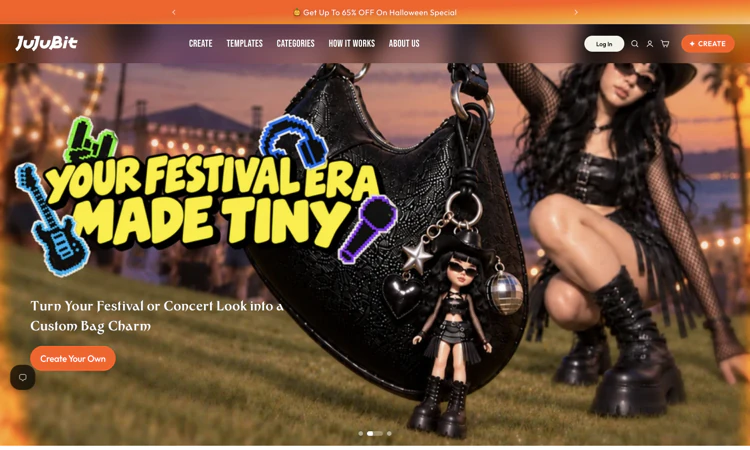
JuJuBit is a custom-product service whose current storefront emphasizes personalized figurines, tabletop miniatures, and related collectibles. Its homepage describes turning a photo or character reference into a design that can be refined and manufactured. JuJuBit displays styles such as TRPG Miniature, Mini Pop, Cinematic, and Realistic, alongside other product categories. The experience extends beyond an on-screen image: the website says artists refine models, pieces are printed in color, and orders are shipped. JuJuBit also lists digital-model services, so buyers must read the selected product carefully to understand the deliverable. Its distinguishing question is whether a reference can become the right object at the right scale. A preview alone cannot establish the final material, surface detail, or delivery time. This review inspected the public storefront without uploading a photo, purchasing a model, or placing a physical order.
For a first visit, the useful question is how quickly a small, well-defined task becomes a result you can inspect. This edition follows that first-project route and explains the decisions that should come before a larger commitment.
How to Use JuJuBit
- Open the official JuJuBit website and confirm the domain before starting a project.
- In JuJuBit, choose Create Your Own or open a specific customization product. Read the deliverable and style choices before assuming the order includes a physical figure or a downloadable file.
- In JuJuBit, provide the requested reference image only when you are comfortable uploading it. Use a clear reference and avoid including unrelated private details in the background.
- In JuJuBit, review the available design and product options. Confirm the pose, color expectations, size, quantity, and any preview or refinement conditions shown for that item.
- In JuJuBit, read the final price and shipping terms before checkout. For a physical item, keep the order confirmation and use the official tracking and support links for fulfillment questions.
JuJuBit: Preparing the Input and Checking the Result
For JuJuBit, prepare a clear photo or original character reference plus the chosen product style and size. The target deliverable is the specific digital service or manufactured collectible described on the product page. Use this as an acceptance condition rather than assuming that every completed draft or preview is ready for its final audience.
Before calling a JuJuBit project complete, check pose, recognizable features, color expectations, fine details, base dimensions, and the actual listed size. Preserve the original material so a correction can be traced to the source. Keep a copy of the accepted deliverable through the available official workflow, especially when storage or access is limited.
JuJuBit: A First Project That Produces a Useful Result
Begin your JuJuBit evaluation with one original character reference, with a written size requirement and a clear decision about digital versus physical delivery. Write down the expected result before changing settings: the specific digital service or manufactured collectible described on the product page. This makes the exercise concrete and keeps an impressive preview from replacing a useful outcome.
For the first JuJuBit session, preserve the original input and change only one major setting at a time. Record what improved and what still needs attention. If the result fails, compare it with the original requirement before spending more time on a more elaborate project. A small test is easier to diagnose and explain to another person.
The next JuJuBit decision is whether the workflow is repeatable. Can you find the same entry point again, understand what was saved, and identify the final deliverable? Keep a short note covering the chosen settings, the limitation encountered, and the next action. A successful first project should leave you with an understandable process as well as a result.
JuJuBit Evaluation Checklist
- JuJuBit input: Prepare a clear photo or original character reference plus the chosen product style and size and confirm that it is appropriate to provide to the service.
- JuJuBit expected result: Define the specific digital service or manufactured collectible described on the product page before judging the first preview.
- Quality review: In the JuJuBit result, check pose, recognizable features, color expectations, fine details, base dimensions, and the actual listed size.
- JuJuBit budget and delivery: Check the selected product, customization options, quantity, shipping, and applicable destination charges against the actual task.
- JuJuBit handoff: Preserve the approved reference, selected style, product specification, size, deliverable, and order confirmation for the next session or reviewer.
Is JuJuBit Safe?
JuJuBit is a storefront with account, cart, policy, and checkout links. A custom reference can expose a face or personal photograph; an order also involves contact, delivery, and payment information. The homepage links privacy, shipping, refund, and creative-rights policies. Those links are useful places to check before ordering, but their presence does not independently verify fulfillment quality. JuJuBit policy pages returned a rate-limit response to the background fetch used for this review, so this guide makes no claim about their detailed retention or refund terms.
For JuJuBit, review the current policies before providing sensitive material. This public-page check is not a security audit.
Why Is JuJuBit Popular?
JuJuBit has an easily shared before-and-after idea: a photo or imagined character becomes a collectible. Tabletop characters, personal gifts, and recognizable styles make that transformation visually understandable. The storefront displays customer reviews and example figures; these remain material presented by the merchant rather than an independent purchase test. No verified single social-media event or origin of a current trend was established during the check.
JuJuBit Not Working?
- Refresh the official page and check whether the issue concerns browsing, account access, processing, or the final deliverable. Try a current browser when a page fails to render correctly.
- For JuJuBit, if the page is obstructed, close the optional discount signup and try the desired product again. The homepage showed an email promotion overlay during the visit.
- For JuJuBit, if a page returns a rate-limit message, pause and try later rather than repeatedly refreshing or submitting duplicate customization requests.
- For JuJuBit, if the issue concerns an existing order, use the official tracking and support entries with the order details. A delivery question cannot be resolved by regenerating a design.
- If a content blocker appears to interfere, temporarily test the official page with that extension paused. Restore the setting afterward and contact official support if the problem persists.
The JuJuBit public homepage was reachable on 2026-10-22; individual account features and jobs were not tested.
JuJuBit Alternatives
Compare JuJuBit alternatives against the required input and deliverable; capabilities and commercial terms differ.
- Hero Forge — an adjacent route for building a customized tabletop character; compare its configurable workflow with photo-based customization.
- Eldritch Foundry — an adjacent custom miniature service when the main requirement is a tabletop character.
- TitanCraft — an adjacent character-miniature design option; confirm the currently offered file and physical delivery choices.
Frequently Asked Questions
What is the official JuJuBit website?
The official JuJuBit website is https://jujubit.ai. Use the official navigation to reach account, pricing, downloads, and support rather than relying on a similarly named search result.
Is JuJuBit free?
JuJuBit sells products and customization services rather than an unlimited free software plan. Prices vary with the selected item, size, and service. Its storefront lists separate digital-model offerings as well as physical figurines, so confirm exactly what the cart contains. JuJuBit displayed a shipping threshold and promotional offers during the visit, but these should be rechecked at checkout. Allow for shipping, destination taxes when applicable, and the difference between a digital preview and a manufactured product.
Do I need an account to use JuJuBit?
Not needed to browse; an account entry exists, and creation or checkout may request customer details.
Who created JuJuBit?
The official public attribution for JuJuBit is JuJuBit; the official storefront credits Tripo AI and Shopify.
Is JuJuBit still available?
Yes: the official JuJuBit public website was accessible when checked on 2026-10-22. No account creation, customer upload, paid output, or physical order was tested.
What should a first-time user test?
JuJuBit: A small project with a visible pass condition is the most useful first test. Use one original character reference, with a written size requirement and a clear decision about digital versus physical delivery, then check pose, recognizable features, color expectations, fine details, base dimensions, and the actual listed size. Expand only after that result meets the original requirement.
What limitations should I check before relying on JuJuBit?
A digital render is not a physical sample; size, fine detail, material finish, file inclusion, manufacturing time, and shipping conditions must be checked for the selected product. A practical JuJuBit evaluation should include one example that exposes the limitation most relevant to your project. Check the current plan or item details again before a subscription, purchase, integration, or external handoff.
Where should I begin with JuJuBit?
Start with JuJuBit and use one original character reference, with a written size requirement and a clear decision about digital versus physical delivery. Keep the source, acceptance condition, and final decision together so the next step is based on an observed result.
Sources and Review Scope
Official references checked or linked from the reviewed website: Official storefront; Customization product.
Last checked: 2026-10-22. Verify current JuJuBit plan details before a purchase or integration.
Related apps

Wowovid – Kling AI Video Generator
Turn photos or text into video with Kling AI. Free preview, HD export with no watermark.
What is Wowovid? Wowovid is a web-based video generation tool built on Kling AI, designed for people who want AI-powered video without dealing with a complicated setup. Upload a…
Explore App
PromptWise
PromptWise – Official Website, What It Is & How to Use
PromptWise Official Website PromptWise is an all-in-one AI creative studio: images, video, audio, AI avatars, and full UGC ad campaigns powered by leading models — Nano Banana…
Explore App
EzCreate
EzCreate puts browser AI editing, generation, model choices, crop ratios, and resolution controls in one image workspace, for a clear first look.
EzCreate: Launch Snapshot for 2026 EzCreate helps designers, online sellers, social creators, and people improving personal photos a cleaner image or a new visual variation…
Explore App
SnapGen AI
SnapGen AI — Explore the core workflow and practical use cases in one concise product listing.
SnapGen AI: A Practical Overview SnapGen AI is a browser-based creative workspace for turning text prompts, product photos, and reference images into new visuals and short…
Explore App
Wizstar AI
Tell your agent what to create.
Wizstar is an AI video platform built for ecommerce brands and content creators who need high-quality video at scale. The Wizstar AI video generator turns text prompts, images,…
Explore App
Image to Layers
Image to Layers – Official Website, What It Is & How to Use
Image to Layers Official Website Image to Layers is an AI image layer decomposition tool that turns one flat image into multiple editable transparent RGBA layers. Official app:…
Explore App