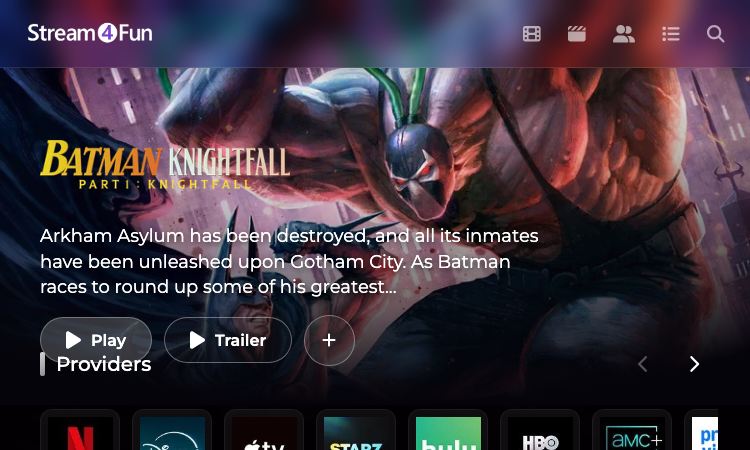
Overview
Stream4Fun Official Website
Stream4Fun is a free browser-based streaming site for watching movies and TV series online, with no app download or account needed.
- Official app: https://stream4fun.net/
- Creator: not publicly listed on the site
- Price: Free
- Login required: No
- Platform: Web (React single-page app)
- Main use: Watch movies and TV shows online in the browser
- Last checked: 2026-09-01
We are not the official developer of Stream4Fun. This page helps users find, understand, and use the product.
What Is Stream4Fun?
Stream4Fun is a free movie and TV show streaming website. People search for it when they want to watch films without signing up for a subscription service or installing an app. The core experience is simple: open the site and you land on a hero banner with the featured title, a Play button and a Trailer button, plus provider logo badges such as Netflix, Apple TV, Hulu and HBO.
Below the hero, the homepage builds rows of curated content with a rating next to each poster: "Trending today", "Horror Movies", "Horror & Comedy", "Comedy Films" and more rows down the page. Every poster shows a clickable score (for example 8.2 or 6.4), letting visitors judge titles before opening them. The top menu gives quick access to Home, Movies, Series, Actors, My List and Search, and a "+" button adds a title to My List. The site is also available in French, Spanish and Italian, and the language can be changed from the preference menu on the bottom of the home page.
How to Use Stream4Fun
- Open the official Stream4Fun website at https://stream4fun.net/.
- Use the top navigation (Home, Movies, Series, Actors) or the magnifying-glass icon to search for a title.
- Browse the "Trending today" row or the genre rows such as Horror Movies and Comedy Films.
- Click a poster to open the title page, then press Play to start watching or Trailer to preview it.
- Press the "+" button on the hero banner to add a title to My List.
- If a dialog asks about language, pick your preference or choose No to keep the default.
Is Stream4Fun Safe?
Based on what was observed when checking the homepage: Stream4Fun requires no registration, no third-party login such as Google or Discord, and no payment or personal information. The site is a React web app served from Stream4Fun.net, and the homepage is free of signup prompts. The only data collected appears to be a browsing preference for language. As with any free-streaming site, ads and redirects can change over time, so treat links and download buttons with caution. Nothing on the homepage requires uploading files or sharing personal data.
Why Is Stream4Fun Popular?
Stream4Fun appears to be gaining attention through direct sharing and word-of-mouth, although there is no clear public source showing where the trend originated. Free no-registration access to movies and TV shows is easy to forward to friends, which usually is enough to drive brand-name searches.
Stream4Fun Not Working?
If Stream4Fun will not load, try:
- Refresh the page.
- Open it in another browser.
- Disable ad blockers temporarily.
- Check whether the original web deployment is still online.
- Try again later if the developer is updating the app.
Stream4Fun Alternatives
- Tubi — free, ad-supported movies and TV with a large catalog
- Crackle — free on-demand movies and original series
- Pluto TV — free live TV channels plus on-demand movies
Frequently Asked Questions
What is the official Stream4Fun website?
The official website is https://stream4fun.net/.
Is Stream4Fun free?
Yes. The site is presented as a free streaming service and no payment is requested on the homepage.
Do I need an account to use Stream4Fun?
No. The homepage shows no registration or login screen; you can browse and play titles without an account.
Who created Stream4Fun?
The site does not publicly list a developer or team on its homepage.
Is Stream4Fun still available?
During the last check on 2026-09-01, the Stream4Fun homepage was online and loading normally.
Featured Lovable Apps
Project Moon Life Simulator
Project Moon Life — Unofficial Life Simulator in The City
English A life simulator set in one unforgiving City Project Moon Life is a free browser-based urban life simulator. Begin as a resident of the Nest, the Backstreets, or the Outskirts. Your birthplace and family set the circumstances of your arrival; what happens next comes from the choices you make, the events you face, and the relationships you build. The City is inspired by the fictional worlds of Lobotomy Corporation and Limbus Company. Each playthrough follows one resident through education, work, relationships, unexpected events, and the consequences that accumulate over time. There is no single ideal route: protecting one part of a life can put another at risk. Start a free life · Read the Field Guide · Visit the Life Archive How a life unfolds Start with a resident — Begin with a randomly generated life or choose a name, story language, and seed. A seed determines the resident’s starting circumstances. Meet the City — Your resident moves through four seasons and encounters opportunities, setbacks, and events shaped by the simulation. Make decisions — Choose how to respond to events, pursue education and work, and navigate relationships. Major events wait for your decision; smaller moments keep moving. Live with the consequences — Choices affect five fictional attributes: health, sanity, resources, connections, and reputation. These are in-game indices, not real-world measurements or money. Reach an ending — A life ends if health or sanity reaches zero and can continue up to age 90. The decisions and events along the way become that resident’s archive. A steady rhythm, with room to speed up The simulation moves through four seasons, with about one real-time minute per simulated year at normal speed. Pause to read and consider a decision, or increase the pace up to 32× to follow the years faster. Major events stop time until you choose. Minor events resolve after 15 simulated seconds by taking their final, cautious option; pausing also pauses that countdown, and risk can still remain. | Key | Action | | --- | --- | | Space | Pause or resume time | | [ / ] | Slow down or speed up | | 1–4 | Choose an available option | | 0 | Let the event pass | Replay the same beginning A life can be replayed or shared through its seed. With the same rules version, seed, and choices, the simulation reproduces the same life across supported story languages. This makes it possible to compare decisions, revisit a turning point, or invite someone else to explore the same starting circumstances. Your local life archive Lives are saved in the current browser without requiring an account. The archive keeps the seasons and decisions that make each run distinct. Export a life backup and import it in another browser to move between devices. An already-open game can continue offline, and simulation time pauses while its tab is hidden. Free play and optional AI chapters The core simulator offers unlimited free lives with no sign-in or payment required. Its built-in events, choices, and endings are driven by the seeded simulation engine. Optional AI chapters can generate additional scenes around a resident’s history and decisions. Project information lists a Freemium model, with paid access starting at $9.90; check the website for current availability and details. Languages and devices The website supports English, Chinese, Japanese, and Korean in modern desktop and mobile browsers. Each life retains the story language selected when it began. Changing the site interface language does not rewrite an existing resident’s story language. Who may enjoy it Project Moon Life is for players who enjoy life simulations, interactive fiction, choice-driven stories, replayable scenarios, and the atmosphere of the City. It can be played casually by letting time move, or more deliberately by pausing at major decisions and tracing how choices change a resident’s attributes and future. Content advisory The experience is rated 15+ and includes fictional death, illness, crime, and psychological distress. Please review the themes before playing. An unofficial fan project Project Moon Life is an independent, unofficial fan work inspired by Lobotomy Corporation and Limbus Company. It is not affiliated with, endorsed by, or produced by Project Moon. The website identifies its visual assets and event writing as original work. Explore the project Play Life Simulator — Begin a free life. Field Guide — Learn the controls, pace, and life rules. Seeds, invitations, and replay — Learn how to share and revisit a starting life. Career paths — Explore work and career routes in the City. Endings, portraits, and achievements — Read about life outcomes and records. Free play and saving FAQ — Find answers about access and saved lives. Life Archive — Return to lives saved in this browser. Support — Contact the project team. Visit projectmoonlife.org and see what kind of life the City gives you. 简体中文 在一座严酷的城市里,体验无数种人生 Project Moon Life 是一款免费的浏览器城市人生模拟器。你将以巢、后巷或外环居民的身份开启人生。出生地与家庭决定了角色来到城市时的处境,之后的道路则由你的选择、遭遇的事件和建立的关系共同塑造。 游戏的城市设定受到《脑叶公司》(Lobotomy Corporation)与《边狱巴士》(Limbus Company)虚构世界的启发。每次游玩都会跟随一位居民经历教育、工作、人际关系和意外事件,并面对日积月累的后果。人生没有唯一的最佳路线:守住生活中的一部分,也可能让另一部分陷入风险。 开始免费人生 · 阅读玩法指南 · 查看人生档案 人生如何展开 开启一位居民的人生 — 随机开始,或设置姓名、故事语言和种子。种子会决定居民最初的处境。 走进城市 — 居民经历四季,遇到由模拟系统推动的机会、挫折和各类事件。 做出选择 — 决定如何应对事件、规划教育和工作,并处理人际关系。重大事件会暂停时间等待选择,日常小事件则会继续推进。 承担选择的后果 — 决定会影响五项虚构属性:健康、理智、资源、人脉和声望。这些是游戏内指数,不代表现实测量值或真实金钱。 走向人生结局 — 健康或理智降至零时人生结束;角色最多可以活到 90 岁。沿途的决定和事件会构成这位居民的人生档案。 稳定的时间节奏,也可以加速 模拟以四季为周期,正常速度下,模拟一年约需现实中的一分钟。你可以暂停时间阅读事件、考虑选择,也可以将速度提高到最高 32 倍,快速经历岁月。重大事件会暂停,直到你做出决定。小事件在 15 个模拟秒后会采用最后一个较谨慎的选项并继续推进;暂停也会暂停倒计时,但选择仍可能带来风险。 | 按键 | 操作 | | --- | --- | | Space | 暂停或继续时间 | | [ / ] | 减速或加速 | | 1–4 | 选择可用选项 | | 0 | 让事件继续发展 | 重玩同一个起点 你可以通过种子重玩或分享一段人生。在规则版本、种子和选择都相同的情况下,即使使用不同的支持语言,模拟也会复现相同的人生。你可以比较不同决定、重新体验人生转折点,也可以邀请其他人从相同的起点开始。 保存在本地的人生档案 人生会保存在当前浏览器中,无需注册账号。档案记录每次人生经历的季节和决定。你可以导出人生备份,再在另一台设备的浏览器中导入。已经打开的游戏可以在离线时继续;当游戏标签页被隐藏时,模拟时间会暂停。 免费游玩与可选 AI 章节 核心模拟器提供不限次数的免费人生,无需登录或付费。内置事件、选择与结局由固定种子的模拟引擎驱动。可选 AI 章节可以围绕居民的经历与决定生成额外场景。产品资料注明采用 Freemium 模式,付费服务起价为 $9.90;当前可用范围和详情请以官网为准。 支持语言与设备 网站支持在现代桌面和移动浏览器中使用英语、中文、日语和韩语。每段人生会保留创建时选择的故事语言;切换网站界面语言不会改写已有居民的故事语言。 适合哪些玩家 如果你喜欢人生模拟、互动小说、选择驱动的故事、可重复体验的情境,或对这座城市的氛围感兴趣,Project Moon Life 值得一试。你可以让时间自然流逝,轻松体验人生;也可以在重大决定前暂停,观察选择如何改变居民的属性与未来。 内容提示 本作标注为 15+,包含虚构的死亡、疾病、犯罪和心理困扰情节。游玩前请先了解这些主题。 非官方同人项目 Project Moon Life 是一项独立的非官方同人作品,灵感来自《脑叶公司》和《边狱巴士》。本项目与 Project Moon 无关联,未获其认可,也不是由其制作。网站说明视觉素材和事件文案为原创内容。 项目链接 开始游玩 — 开启一段免费人生。 玩法指南 — 了解操作、时间节奏和人生规则。 种子、邀请与重玩 — 了解如何分享和重访人生起点。 城市职业路径 — 探索城市中的工作与职业路线。 结局、肖像与成就 — 了解人生结局和记录。 免费游玩与存档 FAQ — 查看游玩和存档相关问题。 人生档案 — 继续查看保存在当前浏览器中的人生。 产品支持 — 联系项目团队。 访问 projectmoonlife.org,看看这座城市会给你怎样的人生。
Explore AppMuse Spark Open
Explore Muse Spark Open, an open-weight multimodal AI model for coding and agents. Find API access, model downloads, deployment guides and documentation.
English About Muse Spark Open Muse Spark Open brings an online AI playground, a hosted API service, and model deployment resources together for developers, researchers, and teams. Start with a concrete question, explore the response in your browser, and use the documentation to plan an integration or a self-managed deployment. The platform focuses on practical tasks: understanding code, investigating software issues, reasoning over supplied documents, interpreting visual context, and planning workflows for AI agents. Adjustable generation settings help you compare approaches using your own prompts and source material. We operate themusesparkopen.com as an independent service. The website provides access tools and educational resources around Muse Spark Open; it is not affiliated with or endorsed by Meta. Model licensing and deployment requirements are described in the resources linked from our documentation. What you can do | Capability | How it helps | | --- | --- | | Online AI playground | Try questions, code, and document passages in a browser, then refine the task through follow-up messages. | | Coding assistance | Explain unfamiliar functions, review proposed changes, investigate errors, and compare implementation choices using the code you provide. | | Reasoning and planning | Work through a technical problem, examine assumptions, and turn a broad objective into a sequence of actionable steps. | | Document analysis | Summarize supplied text, compare passages, and extract decisions, constraints, and open questions. | | Visual understanding | Add supported public image or video URLs to ask about screenshots, diagrams, or other visual material. | | Adjustable controls | Tune the available reasoning effort, system prompt, temperature, and maximum output length for your task. | | Hosted API service | Discuss an integration for your application, internal tools, or evaluation workflow with our support team. | | Deployment resources | Find links to model weights, model cards, licensing information, and inference framework guidance. | | Agent development guidance | Explore how a compatible deployment can combine model reasoning with application-controlled tools. | The current playground accepts text and compatible image or video URLs and returns text. Audio input and tool execution require a separate compatible deployment or integration. Available controls and context limits depend on the connected service; published model capabilities do not define the playground's request limits. Built for practical workflows Software development. Supply the relevant code, error output, and intended behavior. Ask Muse Spark Open to explain a failure, identify edge cases, or suggest a focused change. Review the proposal in the context of your repository before applying it. Technical research and analysis. Bring excerpts from documentation, design proposals, or research notes. Ask for a comparison, a concise explanation, or a list of conclusions supported by the supplied material. Product and operations. Combine written requirements with a screenshot or diagram. Explore implementation questions, summarize feedback, or draft an incident investigation plan with explicit assumptions and next steps. AI agent development. Use the guides to explore planning, function calling, and multi-step tasks in a compatible runtime. Your application defines available tools, validates arguments, and decides which actions to execute. Model evaluation and infrastructure. Compare prompt settings and examine deployment options against your workload. Use your own examples to assess answer quality, latency, memory requirements, and operational fit. Start in the playground Open the playground. Sign in and check your available account credits. Describe one concrete task. Include the relevant text or code, the result you need, and any constraints. Add visual context when useful. Supply a compatible public image or video URL alongside your question. Adjust the available settings. Choose a system prompt, reasoning effort, temperature, and output limit suited to the task. Review and refine. Check the answer against your source material, supply missing context, and ask a focused follow-up. For a repository review, try: Review the following code change. Explain its intended behavior, identify correctness issues supported by the code, and propose the smallest useful fix. Reference the relevant functions and separate confirmed problems from questions that need more context. For an incident investigation, try: Use the supplied timeline and logs to investigate this incident. Identify the most likely causes, explain the evidence for each, and propose a recovery plan with checks to confirm that the service has recovered. Playground conversation context stays on the current page. Refreshing starts a new conversation, so copy any answers you want to keep before leaving. Explore the Muse Spark Open API The Muse Spark Open API service provides a route for teams evaluating hosted integration. Contact support@themusesparkopen.com to confirm the service address, authentication method, supported features, and usage terms for your application. A practical integration process is: Describe your use case, expected request volume, input types, and response requirements. Confirm the endpoint, authentication, limits, and billing details with support. Validate a small request using the agreed configuration. Add response handling and evaluate the results against representative tasks before expanding usage. The API documentation includes a POST /api/playground example for a signed-in session on this website. That example uses the website's session authentication; external application access requires separately confirmed integration details. Model downloads and deployment resources For teams exploring self-managed inference, the documentation brings together links to model weights, the model card, licensing information, and deployment guidance. The website discusses inference options including SGLang, vLLM, TensorRT-LLM, Hugging Face Transformers, Apple MLX, llama.cpp, and Unsloth. Consult the linked framework resources for the model-specific versions, hardware, memory, and quantization requirements relevant to your environment. Begin with a small evaluation: choose a runtime, prepare representative prompts, and measure response quality and resource use. For agent workflows, define the functions your application can expose and validate tool requests before execution. The model supplies reasoning and requested actions; your application controls execution and maintains workflow state. Plans and usage The service uses account credits for playground usage, with subscriptions and one-time credit packs available. Compare current prices, included credits, and plan terms on the pricing page. Credits are reserved before a playground request and settled against reported usage. Cancelled requests, timeouts, or missing final cost information can leave a reservation pending. The usage documentation explains the current behavior; support can help with account and billing questions. About the team The organization behind themusesparkopen.com was founded on May 1, 2026, and is led by Mason King, Founder & CEO, in Seattle, United States. Our team has 10 full-time employees. Our focus is helping developers and teams move from an initial AI experiment to an informed integration or deployment decision. For product questions, technical integration, or collaboration inquiries, email support@themusesparkopen.com. Explore further Website — Product overview and access to the main tools. Playground — Try coding, reasoning, and supported visual inputs. Documentation — Review inputs, settings, API guidance, and deployment resources. Pricing — Compare current subscriptions and credit packs. Blog — Browse product articles and guides. Contact — Get help with the service or discuss an integration. 中文 关于 Muse Spark Open Muse Spark Open 为开发者、研究人员和团队提供在线 AI Playground、托管 API 服务与模型部署资料。你可以从一个具体问题开始,在浏览器中探索回答,再通过文档规划应用接入或自行部署。 平台聚焦实际工作:理解代码、排查软件问题、分析提供的文档、理解视觉内容,以及规划 AI Agent 工作流。通过可调整的生成设置,你可以使用自己的提示词和资料比较不同方案的效果。 themusesparkopen.com 是我们独立运营的服务,提供围绕 Muse Spark Open 的体验工具与学习资料,与 Meta 没有关联,也未获得其背书。模型许可和部署要求可通过使用文档中链接的资料了解。 核心功能 | 功能 | 可以完成什么 | | --- | --- | | 在线 AI Playground | 在浏览器中提交问题、代码和文档片段,通过多轮追问逐步完善任务。 | | 编程辅助 | 解释陌生函数、审阅修改、分析报错,并结合提供的代码比较实现方案。 | | 推理与规划 | 梳理技术问题、检查假设,将较大的目标拆解为可执行步骤。 | | 文档分析 | 总结文本、比较段落,提取决策、约束条件和待解决问题。 | | 视觉理解 | 添加支持的公开图片或视频 URL,围绕截图、图表和其他视觉资料提问。 | | 可调生成设置 | 根据任务调整可用的推理强度、系统提示词、温度和最大输出长度。 | | 托管 API 服务 | 与支持团队讨论面向应用、内部工具或评估流程的服务接入。 | | 部署资料 | 查找模型权重、模型卡、许可说明和推理框架指南。 | | Agent 开发指南 | 了解如何在兼容的部署环境中,将模型推理与应用控制的工具结合起来。 | 当前 Playground 支持文本以及兼容的图片或视频 URL,输出内容为文本。音频输入和工具执行需要单独的兼容部署或集成。可用设置和上下文限制取决于所连接的服务;模型公布的能力范围不能直接视为 Playground 的请求限额。 适用场景 软件开发。 提供相关代码、报错信息和预期行为,让 Muse Spark Open 解释故障、识别边界情况,或提出有针对性的修改建议。应用修改前,结合仓库的实际情况审阅方案。 技术研究与分析。 提供文档节选、设计方案或研究笔记,要求比较不同观点、解释技术内容,或整理有资料依据的结论。 产品与运维。 将需求说明与截图或图表结合,探索实现问题、整理反馈,或起草包含明确假设和后续步骤的故障排查计划。 AI Agent 开发。 通过指南探索兼容运行环境中的规划、函数调用和多步骤任务。应用负责定义可用工具、校验参数,并决定执行哪些操作。 模型评估与基础设施。 对比提示词设置,并根据实际工作负载评估部署选择。使用自己的案例衡量回答质量、延迟、内存需求和运行适配情况。 从 Playground 开始 打开 Playground。 登录账户并检查可用积分。 描述一个具体任务。 提供相关文本或代码,说明期望结果和约束条件。 按需补充视觉信息。 在问题中添加兼容的公开图片或视频 URL。 调整可用设置。 根据任务选择系统提示词、推理强度、温度和输出长度限制。 核对并完善结果。 对照原始资料检查回答,补充遗漏背景,再提出有针对性的追问。 代码审阅提示词示例: 审阅以下代码修改。解释预期行为,指出代码中有依据的正确性问题,并提出最小且有用的修复建议。引用相关函数,将已确认的问题与仍需补充背景的问题分开说明。 故障排查提示词示例: 根据提供的时间线和日志分析这次故障。列出最可能的原因,说明各项判断的证据,并提出恢复计划和用于确认服务恢复的检查步骤。 Playground 的对话上下文保留在当前页面中,刷新后会开始新的对话。离开前,请复制需要保留的回答。 探索 Muse Spark Open API Muse Spark Open API 服务为需要评估托管接入的团队提供支持。请联系 support@themusesparkopen.com,确认适用于你所开发应用的服务地址、认证方式、支持功能和使用条款。 建议按以下步骤开展接入: 说明使用场景、预期请求量、输入类型和响应要求。 与支持团队确认接口地址、身份验证、使用限制和计费细节。 使用确认后的配置验证一个小规模请求。 完善响应处理,并用有代表性的任务评估效果,再扩大使用范围。 API 文档提供了 POST /api/playground 示例,适用于本站已登录会话。该示例使用网站会话认证;外部应用接入需要单独确认相应配置。 模型下载与部署资料 对于希望自行部署推理服务的团队,使用文档汇总了模型权重、模型卡、许可说明和部署指南的入口。 网站介绍的推理选项包括 SGLang、vLLM、TensorRT-LLM、Hugging Face Transformers、Apple MLX、llama.cpp 和 Unsloth。请根据链接中的框架资料,核对适用于该模型和你的环境的版本、硬件、内存与量化要求。 可以先开展小规模评估:选择运行框架,准备有代表性的提示词,测量回答质量与资源消耗。开发 Agent 时,先定义应用可提供的函数,并在执行前校验工具请求。模型提供推理结果和操作请求,应用负责执行控制与工作流状态维护。 套餐与使用方式 Playground 使用账户积分计费,平台提供订阅套餐和一次性积分包。当前价格、包含的积分及套餐条款,请查看价格页面。 Playground 会在发送请求前预留积分,并根据报告的用量进行结算。取消请求、超时或最终费用缺失可能使预留积分处于待处理状态。使用文档介绍了当前处理方式;账户和账单问题可联系支持团队。 关于团队 themusesparkopen.com 背后的组织成立于 2026 年 5 月 1 日,由 Mason King(创始人兼 CEO) 领导,位于美国西雅图,拥有 10 名全职员工。 我们专注于帮助开发者和团队从初步 AI 实验出发,评估适合自己的集成或部署方案。如需咨询产品、技术接入或合作事宜,请发送邮件至 support@themusesparkopen.com。 继续探索 官方网站 — 了解产品并访问主要工具。 Playground — 体验编程、推理及支持的视觉输入。 使用文档 — 查看输入类型、设置、API 指南和部署资料。 价格方案 — 比较当前订阅套餐和积分包。 博客 — 阅读产品文章与使用指南。 联系我们 — 获取服务支持或讨论集成需求。
Explore App
Instinct AI
Your AI director for video, images, voice and music.
Instinct AI is an all-in-one AI creative suite that combines dedicated video, image, audio, and agent workflows in one workspace. Create from text prompts, images, or reference media, then generate and refine projects through the Instinct AI Agent. Shared credits support models such as Seedance, Wan, Kling, GPT Image, Nano Banana, ElevenLabs, and Suno. Use it for text-to-video, image-to-video, reference-to-video, text-to-image, image-to-image, image-to-prompt, transparent PNG creation, text-to-music, voice, and audio generation. It is designed for creators, marketers, e-commerce teams, agencies, and studios.
Explore App
Project Moon Life
Project Moon Life is a free, no-sign-in life simulator where choices shape an original story in a changing City, one resident and lifetime at a time.
Project Moon Life For people browsing a product directory, Project Moon Life is easy to place: it is an independent, narrative-first browser game for players who enjoy interactive fiction and choices with consequences. The product offers a complete premise, a clear entry point, and a reason to replay without requiring an account. A visitor can start immediately, follow one resident’s changing circumstances, and then decide whether to explore the archive or begin another life. That focused loop makes it a useful discovery for anyone seeking a game that fits into a browser and rewards attention more than reflexes. Project Moon Life is a browser-based life simulator about an ordinary resident in an extraordinary, unforgiving City. Each run begins with a person and a set of circumstances the player did not choose, then develops through events and decisions. Rather than follow one fixed hero through a predetermined plot, the experience builds a story from a character’s starting position, relationships, condition, and responses. The player can watch a quiet period pass or stop to consider a difficult moment. The central appeal is seeing a distinct life take shape from the interaction between chance and personal choices. A new life starts in the Nest, Backstreets, or Outskirts, and the resident’s family and early circumstances are generated for that run. These details provide a foundation without deciding the ending. Project Moon Life lets the player enter a life already in motion and discover what opportunities or constraints come with that beginning. A resident may have support, limited resources, or a difficult environment, and those facts can influence which choices feel possible. Starting conditions give replay a clear purpose: a later life can introduce a different neighborhood, family context, or set of needs to understand. The City is more than scenery. It is a fictional society with boundaries, risks, and expectations that shape how a resident moves through daily life. Project Moon Life uses its neighborhoods and archive-like presentation to give each run a recognizable setting, while keeping the focus on the person living inside it. The world can feel familiar in its everyday pressures and strange in its harsher events. A player does not need to arrive with deep knowledge of the inspiration behind the setting; the homepage and Field Guide introduce the experience, and a life can be started directly from the main page. Time moves through four seasons. At the default pace, one year takes about a minute, while a faster setting can advance years at up to 32 times speed. Project Moon Life gives the player control over tempo, which changes the character of a session. A slower pace leaves room to read each event and think through a response; acceleration helps move through stretches that need less attention. Either way, the simulation treats a lifetime as a sequence rather than a single score screen. Players can take one run at a relaxed pace or see how different choices affect several lives over time. The resident dossier tracks five connected measures: health, sanity, resources, connections, and reputation. Each gives a different view of a person’s situation, and none alone describes whether a life is going well. Project Moon Life asks players to consider how a decision may improve one area while placing pressure on another. A change in resources can alter what is available; connections reflect the people who matter; reputation can affect how the wider City responds. These visible measures help make consequences legible without making the future certain. They invite observation, planning, and reflection instead of promising a perfect solution. Events turn the measures into a story. A player may need to protect stability, invest in a relationship, accept a risk, or let an opportunity pass. Project Moon Life builds tension from choices that have trade-offs rather than presenting an obvious answer every time. Circumstances change, and a decision that seems sensible in one life may be difficult in another because the resident’s needs and resources differ. That variation gives the simulation emotional space: a run can become a story about endurance, care, ambition, compromise, or recovery. The player’s priorities help shape the story, even when chance disrupts a plan. The product communicates its boundaries and expectations clearly. Project Moon Life identifies itself as unofficial fan work, credits the original inspiration in context, and warns about mature fictional themes before play. It presents a distinct visual identity and original site writing rather than suggesting that it is an official title. For a visitor comparing interactive experiences, these details make it easier to judge fit and understand the product’s point of view. The combination of free access, multiple interface languages, adjustable pacing, and an archive of completed lives gives both first-time players and returning visitors a practical reason to explore. When a life ends, the archive provides a place to look back at how it unfolded. It keeps the experience from feeling disposable and gives a player a way to compare beginnings, decisions, relationships, and outcomes. Project Moon Life encourages reflection on what made a particular life distinctive: the circumstances at birth, the events that changed direction, or the choices that preserved something important. A later run can offer a fresh perspective, because the new resident does not carry the same starting conditions. The archive and replay loop make the product suitable for both a single complete story and repeated exploration. The visual presentation reinforces the feeling of reading a resident’s file. A dark palette, restrained gold details, city imagery, and editorial typography make the interface feel like part of the fictional archive, while the dossier keeps important information easy to scan. Project Moon Life balances atmosphere with a clear first action: enter the City, begin a life, or read how the system works. The site's own description says the visual assets and event writing are original. This combination gives the experience a distinct identity while keeping its main loop understandable for a first-time visitor. Access is simple: Project Moon Life is free to play in a browser, requires no sign-in, and allows unlimited lives. There is no account setup or download to complete before a visitor can try a run. The homepage offers a start button and a Field Guide, and the archive makes completed lives available to revisit. That low-friction entry makes the product suitable for a short visit as well as a longer session. A player can begin with one resident, pause when a choice deserves thought, and decide later whether to return for a different beginning. The product identifies itself as an unofficial fan-made life simulator inspired by the worlds of Lobotomy Corporation and Limbus Company. Project Moon Life states that it is not affiliated with, endorsed by, or produced by Project Moon, and it gives a content notice for fictional death, illness, crime, and psychological distress. The notice helps visitors understand the tone before they start. Those details are part of the product’s context: it is a work of interactive fiction and simulation, not an official release or factual guide. Players can use the homepage to decide whether the subject matter and atmosphere suit them. The interface supports English, Chinese, Japanese, and Korean, making the entry page available to visitors who prefer different languages. Project Moon Life also separates the main experience into clear destinations: the player can enter the City, review the life archive, or open the Field Guide. The guide helps explain the rules, while the homepage gives enough information to begin without preparation. Those choices make the site easier to approach from a directory listing. A curious visitor can test the core loop first and explore its background later, or read the guide before starting a life.
Explore App
Kenerate AI
AI creative studio for images, video, voiceovers, and music.
Kenerate AI is an AI creative studio for video, images, voiceovers, and music. Explore creative tools, work with reference media, choose AI models, and manage creations in one place. Kenerate AI also supports an agent-style chat workflow for developing ideas into finished creative work.
Explore App
Mistral Large 4: Try Online, Pricing, AP
Use the Mistral Large 4 playground for free. Explore coding, writing and images, compare plans, and connect through the API.
Mistral Large 4 — Online Playground & Mistral Large 4 API Mistral Large 4 brings an online AI playground, developer API, and practical model guides together in one place. Use it to work through code, improve writing, ask questions about supplied documents, and understand images. When a prompt becomes useful enough to repeat, connect the same service to your application through the Mistral Large 4 API. The playground gives individuals and teams a place to try real tasks without writing integration code. Developers can move into an OpenAI-compatible REST interface with streaming responses, structured JSON output, image inputs, and function calling. Documentation, model comparisons, and deployment guides help explain the choices involved in building a workflow. About this service: mistrallarge4.com is independently operated and is not affiliated with Mistral AI. Its accounts, API keys, endpoint, and credit plans belong to this service. The underlying model is developed by Mistral AI. What you can do | Capability | Put it to work | | --- | --- | | AI conversations | Ask questions, explore ideas, and refine an answer through follow-up messages. | | Coding assistance | Explain functions, investigate errors, review implementation choices, and propose focused changes. | | English and Chinese writing | Draft, rewrite, and summarize text with a specified audience, tone, and terminology. | | Document questions | Supply relevant passages and ask for summaries, comparisons, or answers supported by the supplied text. | | Image understanding | Attach a public image URL to ask about a screenshot, diagram, or other visual context. | | Adjustable reasoning | Choose direct answers or higher reasoning effort according to the task. | | Structured responses | Request JSON in the playground or use JSON objects and JSON Schema through the API. | | Streaming API | Receive incremental response content for conversational applications. | | Function calling | Let the model request defined functions that your application validates and executes. | The documentation describes the supported inputs, controls, and service limits for each workflow. Who it is for | Audience | Example workflows | | --- | --- | | Software developers | Review a function, explain an unfamiliar module, or investigate a bug using relevant code and error messages. | | Writers and content teams | Turn a brief into a draft, adjust tone for a specific audience, or refine Chinese and English copy. | | Researchers and analysts | Compare supplied passages, summarize findings, and extract information into a structured response. | | Product and operations teams | Review screenshots, organize written feedback, and draft plans from provided context. | | Independent makers | Explore a product idea in the playground, then add an AI feature to an application. | | AI agent builders | Connect approved lookup functions and application tools to a conversational workflow. | For example, a developer can paste a failing function and its error message, ask for an explanation, and request a small proposed patch. A content team can provide a Chinese passage and ask for a rewrite that preserves product names, dates, and technical terminology. An analyst can attach a diagram URL and ask for an explanation alongside questions that still need clarification. Start in the playground Open the playground and sign in. Use an account on this website to send requests. Describe a concrete task. Include the relevant text, code, or public image URL, together with the result you need. Choose the response settings. Adjust the system prompt, reasoning effort, temperature, maximum output tokens, and text or JSON output. Review the answer. Check the result against your source material and follow up with missing context or corrections. Move a repeatable workflow into your app. Create an account API key and use the documented chat endpoint. A useful coding prompt: Review the following TypeScript function. Explain its purpose, identify edge cases supported by the code, and suggest one small improvement. Return a short explanation followed by the proposed change. A useful document prompt: Summarize the supplied passage for a product manager. Preserve the original dates and numbers, separate decisions from open questions, and cite the relevant passage for each conclusion. If the text does not answer a question, say so. Conversation context remains available while the playground page is open. Refreshing the page starts a new conversation, so copy answers you want to keep before leaving. Build with the Mistral Large 4 API The Mistral Large 4 API connects the service to applications, internal tools, and AI agents through an OpenAI-compatible chat interface. Start with a small text request, then add streaming, image inputs, structured output, or tools as the workflow requires. | Setting | Value | | --- | --- | | Base URL | https://mistrallarge4.com/api/v1 | | Chat endpoint | POST https://mistrallarge4.com/api/v1/chat/completions | | Model ID | mistral-large-4-0 | | Authentication | Authorization: Bearer | | Request format | Content-Type: application/json | | Reasoning effort | none or high | Create a key under Account → API Keys, then set MODELAPIKEY in your server environment to that account key. A minimal request looks like this: For a standard non-streaming response, read the answer from choices[0].message.content and token usage from usage. Keep API keys in your server environment. The API also supports: Streaming: set stream to true to receive Server-Sent Events and process incremental content. Image questions: combine text with an image_url content part pointing to an accessible public image. Structured output: use responseformat with jsonobject or a named json_schema to shape the response. Tool workflows: define functions in tools, inspect returned tool_calls, execute approved functions in your application, and return their results for the next model response. Reasoning control: choose none or high; reasoning tokens share the output budget with the visible answer. See the API guide for complete request examples, limits, and error handling. Use this site's endpoint, model ID, and account key together. Working with inputs and results The service accepts text and public image URLs. For document questions, extract the relevant text from a PDF before submitting it. Direct PDF, audio, and video uploads are not supported by the documented playground and chat API. The playground currently accepts up to 24 messages, 24,000 characters per message, a 96 KiB request body, and up to 16,384 output tokens. API limits differ. The underlying model's advertised context window should not be treated as the playground's input allowance; consult the current service limits when sizing a request. For code tasks, run the proposed change in your own environment. For document and image tasks, check names, numbers, quotations, and small visual details against the supplied material. Validate structured responses before using them in another system. Free access and paid usage Mistral Large 4 uses a freemium model. Signed-in users receive 30 free playground requests per day, resetting at midnight UTC+8 / Asia/Singapore. Requests admitted for generation count toward that allowance, including requests that subsequently fail or are cancelled. After the daily allowance, completed playground answers use credits. One-time credit packs and monthly subscriptions are available for additional usage. The daily free allowance applies to the playground; it does not establish a free allowance for API calls. Compare current prices and included credits on the pricing page, and read the usage guide before integrating billing-sensitive workflows. This service's billing is separate from Mistral AI's official API billing. About the organization The organization behind mistrallarge4.com was founded on May 1, 2026, and is led by Mason King, Founder & CEO, in Seattle, United States. The team has 10 full-time employees and focuses on accessible AI experimentation and developer integrations. This profile introduces the independent web service and its developer entry points. For product questions, account help, or collaboration inquiries, email support@mistrallarge4.com. Explore the product Website — Product overview and model information. Playground — Try text, code, and image questions online. Documentation — Read API examples, controls, and service limits. Pricing — Compare credit packs and subscriptions. Model Comparison — Explore evaluation questions and model choices. Deployment Guide — Review weight availability and deployment considerations. Blog — Browse tutorials and model guides.
Explore App