Overview
Idol Max- Image to 3D
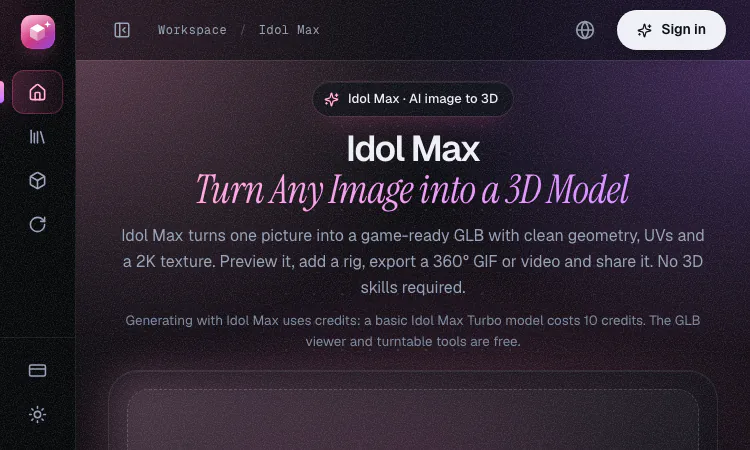
Image to 3D is the quickest way to turn one picture into a usable 3D asset, and Idol Max is an AI service built around that single idea. You upload one image, the Image to 3D service builds a game-ready GLB model, and you can preview, animate, export and share the result without learning 3D modeling. For builders who need props, characters or creatures fast, an Image to 3D job can finish in about 20 seconds on the Turbo model. This entry is written for an AI tools directory, so it explains how the Image to 3D workflow runs, what each file contains, how credits work and where the limits sit.
What Image to 3D means in practice
Image to 3D describes a generative pipeline. The system reads one two-dimensional picture, predicts the shape of the object it shows, builds a mesh and paints the colors the picture suggests. Idol Max follows the same Image to 3D pattern. The site describes it as an image-to-3D model built by fal on top of Idol by SperidLabs, and every result is a single GLB file that carries geometry, UV coordinates, a 2K base-color texture and a normal map. Because an Image to 3D result rests on one view, the input matters more than any setting. A clear, well-lit subject on a simple background gives the model the best chance of reading correctly, which is the cheapest way to avoid wasted credits on a poor Image to 3D run.
Key takeaways
- Image to 3D starts from one PNG, JPG or WebP file up to 10 MB.
- Idol Max Turbo returns a model in about 20 seconds for 10 credits, while Idol Max takes about 50 seconds for 20 credits.
- Each Image to 3D result is a GLB with about 30k triangles, UV coordinates, a 2K texture and a normal map.
- Image to 3D quality depends on the source picture, so test one clean input before you run a batch.
- The GLB viewer and the turntable maker are free for any Image to 3D output and need no sign-in.
How the Image to 3D workflow runs
- Upload. Drop, paste or click to add one picture. The background is removed automatically, so photographs work as well as renders.
- Build. Pick Turbo for fast Image to 3D iteration or Idol Max for the final quality pass. The system predicts the 3D shape and completes the mesh.
- Preview and export. Open the Image to 3D model in the Studio, change the lighting, export a looping 360° GIF or video, download the GLB or share a link.
Every Image to 3D job lands in My Models, where you can download the GLB again or delete it at any time. Treat each step of the Image to 3D workflow as a checkpoint, and stop early if the preview shows a broken shape.
Choosing the right picture for Image to 3D
Good inputs produce better Image to 3D output. Keep these rules in mind:
- Show one object, character or creature in the frame for the best Image to 3D result.
- Use a simple background. The tool removes it, but clutter still confuses the shape.
- Select the render option for 3D screenshots, AI-generated pictures and tight crops, and the photo option for photographs.
- Avoid heavy occlusion, because hidden parts of the subject leave gaps in the Image to 3D mesh.
💡 Tip: The site offers a sample image, a fast way to test the Image to 3D workflow before you upload your own file.
Turbo or Idol Max for each Image to 3D project
| Feature | Idol Max Turbo | Idol Max |
|---|---|---|
| Best for | Fast iteration and many assets | Final quality and faithful colors |
| Typical time | About 20 seconds | About 50 seconds |
| Texture | Color projected from the 3D shape | Base color repainted from your image |
| Credits per model | 10 (+3 rig, +10 PBR) | 20 (+5 rig, +10 PBR) |
Both Image to 3D models return the same files, so the choice changes speed and color fidelity rather than the format. Start with Turbo to test an Image to 3D idea, then send the strongest candidates through Idol Max for the final asset. Splitting a batch of Image to 3D jobs this way keeps credit spend predictable.
What arrives in the GLB file
Each Image to 3D download is a single GLB with a lightweight mesh of about 30k triangles, proper UV coordinates, a 2K base-color texture and a normal map. The site says the file drops into Unity, Unreal, Godot and three.js. Keep the GLB from each Image to 3D run as your master file, because the viewer, the turntable tool and any engine that reads GLB can open it directly, so you never need to repeat an Image to 3D job just to inspect the output.
Rigging, animation and PBR add-ons
Switch on rig for characters and creatures in your Image to 3D project. Idol Max then adds a skeleton, skin weights and looping walk, run, jump and idle clips when the skeleton can play them, and the rig charge is refunded if the rig fails. PBR maps add roughness and metallic maps to any Image to 3D model for realistic shading in any engine. Both add-ons extend the core Image to 3D output rather than replacing it. They are optional, so an Image to 3D job for a static prop can stay at the base price.
Credits, pricing and refunds
Credit packs for Image to 3D start at $10, and credits never expire. A basic Turbo model costs 10 credits and a full Idol Max model costs 20, so a budget for Image to 3D work is easy to plan. Failed generations are refunded.
| Pack | Credits | Approximate Turbo models |
|---|---|---|
| $10 | 400 | about 40 |
| $25 | 1,250 | about 125 |
| $50 | 3,000 | about 300 |
| $100 | 7,000 | about 700 |
Generating requires signing in with Google, which keeps your credits and models with your account. Start your first Image to 3D model from the homepage whenever you are ready.
Free tools that work with your output
The GLB viewer opens any GLB in your browser, so you can check lighting and materials and save a PNG. The 3D turntable maker turns a GLB into a seamless 360° GIF, MP4 or WebM. Both tools run in the browser with no sign-in and no upload, and they work with every Idol Max download. Use them as a free quality check after each Image to 3D run, before you share or publish a model, and they help you inspect every Image to 3D result.
Frequently asked questions
Q: What is Idol Max?
A: Idol Max is an Image to 3D model built by fal on top of Idol by SperidLabs. On this site you upload one image and get a game-ready GLB with UVs and a 2K texture, plus an optional rig and animations.
Q: Which pictures work best for Image to 3D?
A: A clear picture of one object, character or creature. Use the render option for illustrations and AI-generated pictures, and the photo option for photographs.
Q: Can I use Image to 3D models commercially?
A: The site says Image to 3D assets generated through the fal API can be used in commercial projects, including games you ship. Check fal's terms and make sure you have the rights to the image you upload.
Q: Do I need an account?
A: You can browse the site and use the GLB viewer and turntable tools without one. Generating an Image to 3D model requires signing in with Google.
Next steps
Start with one clear picture, run a Turbo test, and inspect the GLB in the free viewer before you spend more credits. When the Image to 3D shape holds up, send the same picture through Idol Max for the final colors. IdolMax.net is an independent site that runs Image to 3D through Idol Max and Idol Max Turbo via the fal API, so describe it that way when you link to it. Ready to begin? Open Image to 3D on IdolMax.net and upload your first picture.
Related apps

ZIGGLE.ART
Create your animated brand mascot 🦄
Most apps are boring and forgettable. Stand out from the sea of sameness. Your app deserves a PERSONALITY. Create your custom fully animated mascot in 10 minutes as easy as a…
Explore AppBanana AI
Banana AI: Create, edit, and enhance images online with AI tools, prompt inspiration, style ideas, and 4K-quality output
Banana AI is an online image creation and editing website built around AI-powered visual tools. In addition to basic image generation, the site also covers prompt resources,…
Explore App
Wowovid – Kling AI Video Generator
Turn photos or text into video with Kling AI. Free preview, HD export with no watermark.
What is Wowovid? Wowovid is a web-based video generation tool built on Kling AI, designed for people who want AI-powered video without dealing with a complicated setup. Upload a…
Explore App
Imagine Image
Imagine Image: the free AI generator people find when searching Grok Imagine Image, now running on Imagine Image 2.0 — n
If you searched Grok Imagine Image, here's what you found: Imagine Image, a free AI generator running on Imagine Image 2.0. What it does Text-to-image — describe a scene, get a…
Explore App
Ideogram Studio
Ideogram 4 AI workflows for text-perfect visual creation
Ideogram Studio is an independent browser-based creative platform centered on Ideogram and Ideogram 4 AI image generation. It supports text-to-image and image-to-image workflows…
Explore AppPixMira AI
PixMira AI is an online AI image generator and photo editor.
PixMira AI AI Image Generator and Photo Editor for Modern Visual Creation PixMira AI is an online AI-powered visual creation platform that brings image generation, photo editing,…
Explore App