Entertainment Apps
Discover beautiful apps crafted with vibe coding across different categories. Explore our curated collection of lovable applications.
Categories

195-0
195-0 – Official Website, What It Is & How to Use
195-0: World Draft is a free, satirical fantasy-conquest browser game. You draft five real-world figures to run your regime — President, Vice President, General, Propaganda Minister, and Treasurer — then send your unqualified cabinet out to conquer all 195 nations. History will not be kind, but it will be entertaining. Official app: https://the-cabinet-beta.vercel.app/ Creator: an independent developer / Lovable builder (no public company page found) Price: Free Login required: No Platform: Web (Vercel) Main use: A comedy strategy game about drafting a cabinet and trying to conquer the world Last checked: 2026-08-26 What Is 195-0: World Draft? 195-0: World Draft is a browser-based "fantasy world conquest" game. You start by filling a Cabinet of five roles: President, Vice President, General, Propaganda Minister, and Treasurer. Each role is filled by drafting a candidate from a rotating "pool" — you spin for a category (such as Athletes) and a country (such as USA), then pick candidates to slot into your government. Once the regime is assembled, you send it off to conquer the 195 nations of the world, and the game reacts with a simulated final record and a verdict like a "Diplomatic Disaster". It is less a serious strategy sim and more a comedic, absurd "what if" generator where the fun comes from the mismatched people you put in charge. The core loop is fast: pick a category, respin the country, draft a candidate into an open Cabinet role, repeat until the Cabinet is full, then launch the conquest. It is designed for quick, shareable sessions rather than long-term strategy. How to Use 195-0: World Draft Open the official website at https://the-cabinet-beta.vercel.app/. Click Enter The Draft to begin Round 1 of 5. For each Cabinet role, spin the category (e.g. Athletes) and the country (e.g. USA) to reveal a pool of candidates. Tap View Candidates and Draft Them to assign a candidate to an open role such as President or General. Fill all five Cabinet roles, then press Conquer The World to run your campaign. Review your Final Record (e.g. 18-177) and the game's verdict, then hit Try Again or Back To Home to start a new draft. The tools here are simple and immediate: category respin, country respin, and a candidate viewer. There is no account, no long onboarding, and no tutorial pop-up — you are in the draft within one click. Is 195-0: World Draft Safe? Yes — this is a simple, no-login browser game. No Google or Discord sign-in is required, no files, photos, or personal information are uploaded, and there is no payment step. The site runs on Vercel (a mainstream hosting platform) and does not push obvious ads or redirects. It is a self-contained client-side game you can open and play in seconds. As always, avoid entering any personal data you would not want shared, though nothing here asks for it. Why Is 195-0: World Draft Popular? 195-0 appears to be gaining attention through direct sharing and word-of-mouth, which is the typical path for a quirky, single-session browser game. Its appeal is the comedic premise — electing an absurd cabinet and watching a doomed conquest unfold — plus a clean, dark, neon-accented UI and a quick loop that is easy to screenshot and share. There is no clear public source showing exactly where the trend originated, but the game's humor and one-click replayability make it easy to spread by link. 195-0: World Draft Not Working? If the game will not load, try: Refresh the page. Open it in another browser. Disable ad blockers temporarily. Check whether the Vercel deployment is still online. Try again later if the developer is updating the app. Frequently Asked Questions What is the official 195-0: World Draft website? The official website is https://the-cabinet-beta.vercel.app/. Is 195-0: World Draft free? Yes, the game is free to play with no payment step. Do I need an account to use 195-0: World Draft? No, you can play without creating an account or signing in. Who created 195-0: World Draft? The creator is not listed publicly; it appears to be an independent developer or Lovable builder. The app runs on Vercel. Is 195-0: World Draft still available? The site was online and playable as of 2026-08-26.

a little box of goodies
a little box of goodies – Build a digital care package of notes, photos, songs and voice messages for someone special.
A Little Box of Goodies Official Website A Little Box of Goodies is a digital care package builder that turns notes, photos, songs and voice messages into a shareable parcel for someone you care about. Official app: https://alittleboxofgoodies.com/ Creator: from.collette (Instagram) Price: Paid (one-time payment to generate the share link) Login required: No (your email is only used to deliver the package link) Platform: Web (hosted on Vercel) Main use: Sending a personalized digital care package to someone special Last checked: 2026-08-23 Visit A Little Box of Goodies We are not the official developer of A Little Box of Goodies. This page helps users find, understand, and use the product. What Is A Little Box of Goodies? A Little Box of Goodies is an online gift builder styled like a vintage shipping label and a shop receipt. Instead of texting a plain "thinking of you", you assemble a parcel: write the recipient's name on a paper label, choose what to tuck inside — a note, a photo, a song, a video, a voice recording, a hand drawing, a map location, a coupon or a news link — and then pay to generate a private link. The recipient opens the link, taps a wrapped box to unwrap it, and goes through each item one by one. It solves the problem of long-distance affection: sending care across time zones, cheering up a homesick friend, or marking a birthday you cannot attend in person. What makes it different from a photo collage or a messaging app is the ritual — the receipt-style checklist, the unwrapping moment, and the keepsake link — which makes receiving it feel closer to opening a real gift than scrolling a chat. How to Use A Little Box of Goodies Open the official A Little Box of Goodies website. Fill in the "to / title" and "from / your name" fields on the shipping label. Pick the items to tuck inside and add your content (text, uploads, links, drawings, voice clips). Click "Pay & Generate Link", complete the checkout, and copy the package link to send to your person. Is A Little Box of Goodies Safe? The site does not require an account or a Google / Discord social login; you only provide an email so the package link can be sent to you after payment. Uploaded photos and voice clips are stored only as part of the package you create. Payment is handled through a Stripe-style checkout session, so the site itself never asks for card details. The site runs on Vercel, uses HTTPS, and shows no visible ads or redirects. The main things to keep in mind: the share link is effectively public to anyone who has it, and the payment step happens before the link is generated. Why Is A Little Box of Goodies Popular? A Little Box of Goodies appears to be gaining attention through direct sharing and word-of-mouth, although there is no clear public source showing where the trend originated. A Little Box of Goodies Not Working? If A Little Box of Goodies cannot be reached, you can try: Refresh the page. Open it in another browser. Disable ad blockers temporarily. Check whether the original Vercel deployment is still online. Try again later if the developer is updating the app. If the original site is confirmed down: The original A Little Box of Goodies website appears to be unavailable as of 2026-08-23. A Little Box of Goodies Alternatives If you like the idea of sending personal digital gifts, you can also try: Kudoboard — a group board where friends collect messages, photos and GIFs for someone Cameo — personalized video messages from creators and celebrities GroupGreeting — a group greeting card that everyone signs online Frequently Asked Questions What is the official A Little Box of Goodies website? The official website is https://alittleboxofgoodies.com/. Is A Little Box of Goodies free? Building and previewing a package is free, but generating the shareable link requires a one-time payment. Do I need an account to use A Little Box of Goodies? No account or social login is required; an email is used only to deliver your package link after payment. Who created A Little Box of Goodies? It was created by the Instagram creator from.collette. Is A Little Box of Goodies still available? Yes — the site was online and functional as of 2026-08-23.
Soundgo
Soundgo - Play chords and melodies with your hands through your webcam. Free browser instrument, no install.
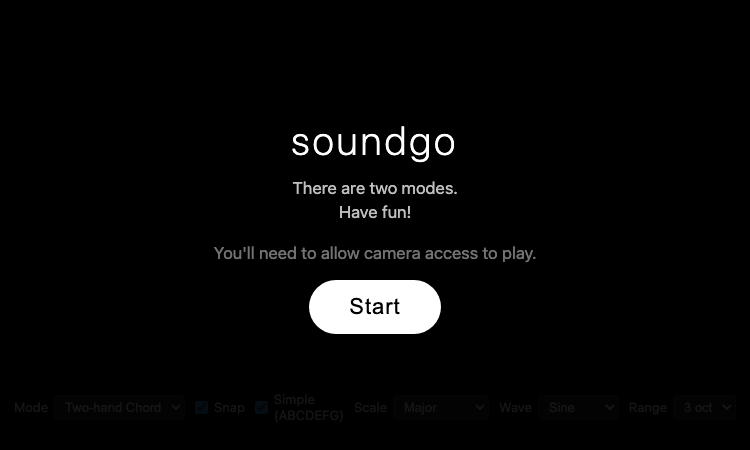
Soundgo Official Website Soundgo is a webcam-based music instrument that lets you play chords and melodies with your hands. Official app: https://sound.gojaehyun.com/ Creator: Go Jaehyun (portfolio: gojaehyun.com) Price: Free Login required: No Platform: Web (gojaehyun.com subdomain) Main use: Playing music by moving your hands in front of a webcam Last checked: 2026-08-22 Visit Soundgo We are not the official developer of Soundgo. This page helps users find, understand, and use the product. What Is Soundgo? Soundgo is a browser instrument that turns your webcam into a musical interface: you play chords and melodies by moving your hands in the air. The site uses Google's MediaPipe Hands to track your fingertips in real time and Tone.js to synthesize the sound, so there is no instrument to buy and nothing to install — just a camera and a browser. The interface shows two circular "wheels" on screen: one for chords and one for melody, and your fingertips act as cursors over them. The app offers two modes: "Two-hand Chord" and "Melody + Chord". You can pick a scale (Major, Pentatonic, Minor, Blues, or Chromatic), a waveform (Sine, Triangle, Saw, or Square), and a range of 2, 3, or 4 octaves. The developer tuned the tracking carefully — fingertip positions are smoothed so your hand does not misfire, and chord changes are debounced so a fingertip resting on a boundary does not flicker. The UI is bilingual (English and Korean), and the app asks for camera permission before it starts. How to Use Soundgo Open the official Soundgo website. Click "Start" and allow camera access when the browser asks. Choose a mode: Two-hand Chord or Melody + Chord. Pick a scale, waveform, and octave range from the controls. Move your hands in front of the webcam — your fingertips hover over the on-screen wheels to play chords and melodies. Is Soundgo Safe? What can be verified about Soundgo: it is a static web page on the gojaehyun.com domain, the personal site of developer Go Jaehyun. There is no registration, no third-party login, no payment, and no file upload. The app requires webcam access — that is its whole purpose — and the camera feed is processed locally in the browser using MediaPipe's client-side hand tracking; the page loads its libraries from the jsDelivr CDN. The site has no ads and no redirects. The only privacy consideration is the camera permission itself: the app cannot work without it, and you should only grant it if you are comfortable with webcam use. Why Is Soundgo Popular? Soundgo appears to be gaining attention through direct sharing and word-of-mouth, although there is no clear public source showing where the trend originated. The concept is inherently shareable — playing music with your hands in the air looks like magic on video, and the "webcam instrument" idea fits the wave of AI-powered and gesture-based web experiments. It is also a polished personal project by a developer with a public portfolio, which makes it easy to link and recommend. Soundgo Not Working? If Soundgo cannot be accessed, try: Refresh the page. Open it in another browser. Allow camera access in the browser permission prompt — the app cannot work without it. On mobile, rotate your device to landscape; the app requires landscape orientation. Check whether the sound.gojaehyun.com site is still online. Soundgo Alternatives If you like Soundgo, you can also try: Chrome Music Lab — free browser experiments for making music with your mouse or touch Piano Genie — Google's AI piano game where any key press plays something musical Theremin — the classic instrument played by moving your hands near an antenna Frequently Asked Questions What is the official Soundgo website? The official website is https://sound.gojaehyun.com/. Is Soundgo free? Yes, Soundgo is completely free to use with no payment step anywhere. Do I need an account to use Soundgo? No. There is no registration or login — you only need to allow camera access. Who created Soundgo? Soundgo was created by Go Jaehyun, a developer whose portfolio is at gojaehyun.com. Is Soundgo still available? Yes, the site was online and playable as of 2026-08-22.

Longruay
Longruay - Live like a millionaire for 30 days: AI life simulation, US$100 million, one wealth decision per day.
Longruay Official Website Longruay is a 30-day millionaire simulator and AI life simulation game. Official app: https://longruay.com/ Creator: Not publicly listed (contact: contact@longruay.com) Price: Freemium — first AI-powered month free, then credits from $1.99 Login required: Yes (Google or email sign-in) Platform: Web (longruay.com) Main use: Wealth decision game — manage US$100 million through one choice per day for 30 days Last checked: 2026-08-22 Visit Longruay We are not the official developer of Longruay. This page helps users find, understand, and use the product. What Is Longruay? Longruay is a browser game that answers a fun question: what would you actually do with US$100 million? You start with that exact sum and play through 30 fictional days, making one wealth decision per day — buy the house, finance the acquisition, protect the team, or walk away. The site describes itself as "an AI life simulation", because each day brings a private briefing from Mira, an AI chief of private office who presents investments, acquisitions, invitations, and crises around your current story. Longruay is built to feel consequential. The homepage shows a sample day: "DAY 17 / 30, US$108.4M — The harbor hotel: a beautifully run independent hotel needs a patient new owner" with three choices (acquire with disciplined debt, bring in an operating partner, or protect liquidity and walk away). The company emphasizes that AI writes the briefings but never decides the results — a deterministic engine calculates every financial and personal consequence against visible, tested rules. At the end of the month you receive a private report with a full balance sheet, five personal metrics, and an outcome title like "empire builder", "cultural patron", "quiet sovereign", or "golden cage". How to Use Longruay Open the official Longruay website. Click "Enter your private office" or "Start with US$100 million". Choose one of three identities: Tech Founder, Family Wealth Heir, or Global Investor. Read the daily briefing from Mira and pick one of the choices each day, for 30 days. Collect your final report with the balance sheet, personal metrics, and outcome title. Is Longruay Safe? What can be verified about Longruay: the site is a web game run on longruay.com, with Terms, Privacy, and Contact pages in the footer and a contact email (contact@longruay.com). The FAQ states explicitly that the game is "a fictional wealth decision game for entertainment" and is not real financial advice — all companies, assets, prices, and people are invented. Payment is only for credits (one-time purchases from $1.99, no auto-renewal, credits never expire), and the site promises that a month can always be finished for free using handcrafted scenarios. The game requires personal choices but no file uploads. It appears to be a paid/hobby project with a transparent pricing page rather than an anonymous ad-supported site. Why Is Longruay Popular? Longruay appears to be gaining attention through direct sharing and word-of-mouth, although there is no clear public source showing where the trend originated. The premise is strong for sharing — "live like a millionaire for 30 days" — and each run ends with a personal verdict ("quiet sovereign" with a US$116M balance) that players screenshot and compare. The mix of a visible simulation engine with personalized AI briefings also gives the game a "cool AI product" angle that has been trending in 2026. Longruay Not Working? If Longruay cannot be accessed, try: Refresh the page. Open it in another browser. Disable ad blockers temporarily. Check whether the longruay.com site is still online. Try again later if the developer is updating the game. Longruay Alternatives If you like Longruay, you can also try: BitLife — a life-simulation game where every choice changes your character's fortune AdVenture Capitalist — a money-management idle game about growing wealth The Sims — a life simulation where you manage your sim's career, home, and relationships Frequently Asked Questions What is the official Longruay website? The official website is https://longruay.com/. Is Longruay free? It starts free: the first complete AI-powered month is included. After that, AI briefings cost 2 credits each, with one-time packs from $1.99 (200 credits). Handcrafted scenarios and failed AI requests are always free. Do I need an account to use Longruay? Yes — the game continues across devices, which requires an account/session. Registration is simple and the first month is free. Who created Longruay? The developer is not publicly identified; the site offers contact at contact@longruay.com. Is Longruay still available? Yes, the site was online and playable as of 2026-08-22.
Longruay Vercel App
Longruay Vercel App - Free fantasy shopping: try being rich for 5 minutes, checkout with no real payment.
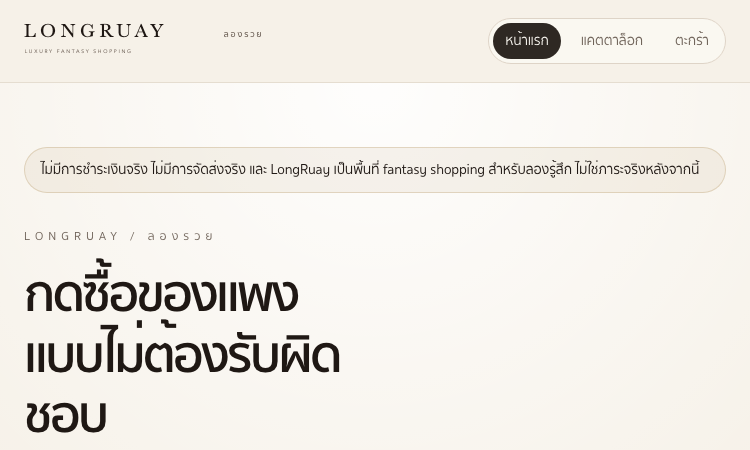
Longruay Vercel App Official Website Longruay Vercel App is a Thai-language fantasy shopping site where you can "try being rich for 5 minutes". Official app: https://longruay.vercel.app/ Creator: Not publicly listed (Vercel deployment, "Powered by RAMO" in footer) Price: Free Login required: No Platform: Web (Vercel) Main use: Browsing luxury items, adding them to a cart, and checking out without real payment Last checked: 2026-08-22 Visit Longruay Vercel App We are not the official developer of Longruay Vercel App. This page helps users find, understand, and use the product. What Is Longruay Vercel App? Longruay Vercel App is a "fantasy shopping" website in Thai — the tagline translates to "Try being rich for 5 minutes". The idea is simple: you browse luxury objects, add them to a cart, and press checkout, but no real money is ever charged and nothing is ever delivered. The site is upfront about this: "No real payment, no real delivery — LongRuay is a fantasy shopping space for trying the feeling, not taking on real burdens." The catalog holds 36 fantasy objects spread across 5 "rich lives" you can try on: Bangkok Power (sky residences and long cars), Coastal Escape (cliffside villas and resort bags), Old Money Weekend (estate homes and weekend cars), Midnight Status (black supercars and night duplexes), and Impossible Wealth (private vehicles and orbital penthouses). Items include a Sathorn Sky Residence at ฿79,000,000, an Andaman Private Villa at ฿96,000,000, a Vanta R Midnight supercar at ฿14,500,000, and a Fifth Horizon Address at ฿336,000,000. The cart can mix items across all five worlds, and a "surprise me" button picks a random rich life for you. How to Use Longruay Vercel App Open the official Longruay Vercel App website. Click "เข้าแคตตาล็อก" (Enter Catalog) to browse the 36 fantasy objects, or click "สุ่มให้เลย" (Surprise Me) for a random pick. Choose one of the 5 modes (Bangkok Power, Coastal Escape, Old Money Weekend, Midnight Status, Impossible Wealth) to filter the catalog. Click "ใส่ตะกร้า" (Add to Cart) on any item, then open the cart and press checkout — no payment is ever taken. Is Longruay Vercel App Safe? What can be verified about Longruay Vercel App: it is a static web app deployed on Vercel with no registration, no third-party login, and no payment step — the site explicitly states there is no login and no payment. Nothing is uploaded and no personal information is collected to make a purchase, because purchases are fictional. The site is in Thai and aimed at a general audience; the content is playful luxury fantasy with no ads or redirects on the pages we checked. The developer is not publicly identified (the footer credits "RAMO" as the platform), so treat it as an anonymous hobby project — fun and low-risk, but with no support guarantees. Why Is Longruay Vercel App Popular? Longruay Vercel App appears to be gaining attention through direct sharing and word-of-mouth, although there is no clear public source showing where the trend originated. The concept is inherently shareable: "try being rich for 5 minutes" is a one-line pitch that works in group chats, and screenshots of absurd carts (a ฿336M penthouse plus a supercar) make easy social media content. The five themed "rich lives" also give the site a playful, aspirational angle that fits the current trend of fantasy-shopping and "what would you buy" games. Longruay Vercel App Not Working? If Longruay Vercel App cannot be accessed, try: Refresh the page. Open it in another browser. Disable ad blockers temporarily. Check whether the original Vercel deployment is still online. Try again later if the developer is updating the app. Longruay Vercel App Alternatives If you like Longruay Vercel App, you can also try: Farfetch — a real luxury fashion marketplace for browsing high-end items 1stDibs — a luxury design marketplace for furniture, art, and collectibles Sotheby's — a luxury auction house where you can browse extraordinary objects Frequently Asked Questions What is the official Longruay Vercel App website? The official website is https://longruay.vercel.app/. Is Longruay Vercel App free? Yes, the site is completely free — no payment is ever taken, because the shopping is fantasy. Do I need an account to use Longruay Vercel App? No. The site explicitly states there is no login and no payment. Who created Longruay Vercel App? The developer is not publicly listed. The site is deployed on Vercel and credits "RAMO" in the footer. Is Longruay Vercel App still available? Yes, the site was online and playable as of 2026-08-22.
2 Player Github Io
2 Player Github Io - Free 2-player browser games: fullscreen, ad-free, no downloads, no login. Bad Ice-Cream 2 & more.
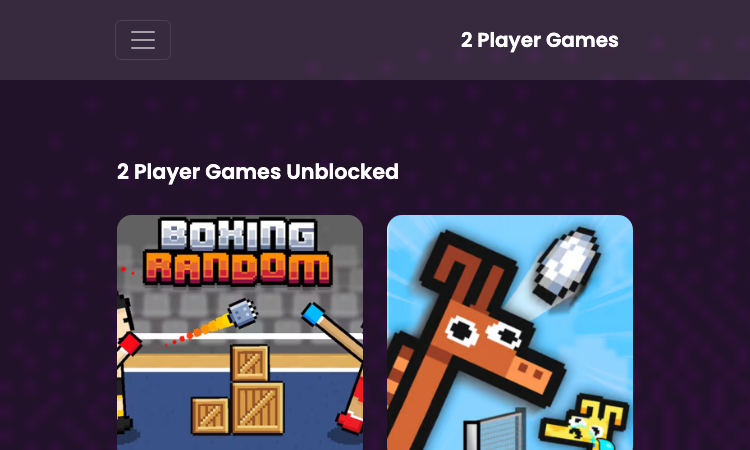
2 Player Github Io Official Website 2 Player Github Io is a free browser portal of two-player games hosted on GitHub Pages. Official app: https://2player-online.github.io/ Creator: Not publicly listed (GitHub Pages site) Price: Free Login required: No Platform: Web (GitHub Pages) Main use: Playing two-player browser games with a friend on one keyboard Last checked: 2026-08-21 Visit 2 Player Github Io We are not the official developer of 2 Player Github Io. This page helps users find, understand, and use the product. What Is 2 Player Github Io? 2 Player Github Io is a static game portal that collects two-player browser games you can start in seconds. The whole site runs on a github.io domain, which means there is no installer, no launcher, and no account system — you open the page, pick a game, and it loads inside the browser window. That is the entire pitch, and it holds up in practice: from the homepage you can jump straight into titles like Bad Ice-Cream 2, Stick Fighter, Wrassling, ZOOM-BE 3, and Ludo Multiplayer without ever leaving the tab. The layout is a straightforward grid of game thumbnails. Clicking any thumbnail on 2 Player Github Io opens a dedicated game page with a fullscreen button, so the game expands to fill your monitor instead of sitting in a small embedded frame. There is no sign-up wall anywhere — no email field, no Google login, no "create an account to continue" popup. You simply arrive and play, which is exactly what most people want from a quick two-player session. How to Use 2 Player Github Io Open the official 2 Player Github Io website. Pick a game from the thumbnail grid on the homepage, or use the category menu (2 Player, Car, Sports, Racing, Stickman, Puzzle, and more) to narrow the list. Click the game thumbnail to open its dedicated page. Press the fullscreen button if you want the game to fill the whole monitor, then start playing with a friend on the same keyboard. Is 2 Player Github Io Safe? Based on what is verifiable on the site itself: 2 Player Github Io requires no registration and no third-party login, does not ask for payment, and does not collect files or personal information — it is a static GitHub Pages site with no backend. The site advertises itself as ad-free, and the pages we checked show no pop-up ads or redirect chains. The games load from a companion github.io host via iframes. There is also a DMCA page, which suggests the operator takes content takedowns seriously. As with any free game site, we cannot guarantee the behavior of every embedded game, so treat it as a low-risk but not zero-risk environment. Why Is 2 Player Github Io Popular? The "github io" pattern is well known among browser gamers: github.io sites are fast, free, and require nothing to install, so they spread quickly through direct link sharing in classrooms, group chats, and social media. 2 Player Github Io appears to be gaining attention through direct sharing and word-of-mouth, although there is no clear public source showing where the trend originated. 2 Player Github Io Not Working? If 2 Player Github Io cannot be accessed, try: Refresh the page. Open it in another browser. Disable ad blockers temporarily. Check whether the original GitHub Pages deployment is still online. Try again later if the developer is updating the site. 2 Player Github Io Alternatives If you like 2 Player Github Io, you can also try: Fireboy and Watergirl (Poki) — the classic two-player cooperative puzzle series Tank Trouble — a chaotic 2-3 player tank battle game in the browser 1v1.lol — a popular browser shooter with head-to-head duels Frequently Asked Questions What is the official 2 Player Github Io website? The official website is https://2player-online.github.io/. Is 2 Player Github Io free? Yes, all games on 2 Player Github Io are free to play with no payment step anywhere on the site. Do I need an account to use 2 Player Github Io? No. The site has no registration, no email field, and no third-party login. Who created 2 Player Github Io? The developer is not publicly listed. The site is hosted on GitHub Pages, and the game files are served from a companion github.io account. Is 2 Player Github Io still available? Yes, the site was online and playable as of 2026-08-21.

Age Of Discovery2 Vercel
Age Of Discovery2 Vercel — a 3D globe with ocean and ship, plus five cinematic cameras to explore the world.
Age Of Discovery2 Vercel Age Of Discovery2 Vercel is a 3D ocean and globe scene inspired by the Age of Discovery, where a ship crosses the sea and a cinematic camera lets you follow it. It is a free browser experience — open the page, and you are exploring. Here is how to use Age Of Discovery2 Vercel. Step 1: Open the scene. Age Of Discovery2 Vercel loads directly in your browser. No account, no install, no loading screens — the 3D scene appears immediately. The globe, the ocean, and the ship are rendered in real time with WebGL on Age Of Discovery2 Vercel. Step 2: Use the camera moves. Age Of Discovery2 Vercel gives you five cinematic camera buttons. 俯冲 (dive) plunges the camera toward the water. 长降 (long descend) glides the view downward in a long smooth path. 环绕 (orbit) circles the camera around the scene to see it from every angle. 掠过 (swoop) sweeps low past the surface for a fast, thrilling pass. 超变焦 (hyperzoom) pulls the camera in dramatically, like a broadcast zoom. Step 3: Watch the ocean move. The water in Age Of Discovery2 Vercel is not a flat texture — it is a shader-driven ocean with waves, crests, and specular highlights. The engine settings behind the scene include wave crest sharpness, slope variance, and highlight variance, which is why the sea looks alive rather than painted. Step 4: Explore at your own pace. There is no goal, no timer, and no score on Age Of Discovery2 Vercel. The point is the journey: pick a camera move, watch the scene from a new angle, and imagine the sailors of the Age of Discovery looking at the same open water centuries ago. Step 5: Try it on any device. Age Of Discovery2 Vercel works on desktop and mobile browsers. The camera buttons of Age Of Discovery2 Vercel are large enough to tap on a phone, and the scene scales to any screen. Age Of Discovery2 Vercel is free, fast, and cinematic. It is the age of discovery rendered in WebGL — one scene, one ship, one ocean, and five ways to see it. Open the page, choose a move, and explore.

Kotoba 3D Dice 2026 Vercel
Kotoba 3D Dice 2026 Vercel — put 6 words on a 3D dice, roll it, and let fate pick your answer.
Kotoba 3D Dice 2026 Vercel Kotoba 3D Dice 2026 Vercel is a 3D word dice from Japan — the ずご抽選器 — where you write six words and roll to decide. It turns "what should we do?" into a moment of fun. Here is how to use Kotoba 3D Dice 2026 Vercel. Step 1: Enter your six words. Open Kotoba 3D Dice 2026 Vercel and write six words into the fields — one per face of the dice. Dinner options, homework subjects, weekend plans, anything with choices. The inputs are auto-saved to your device, so you can close the tab and come back later. Step 2: Roll the dice. Hit the roll button on Kotoba 3D Dice 2026 Vercel and watch the 3D cube tumble with a springy animation. You can also tap the dice itself. When the dice settles, one face is the winner — highlighted with a golden glow and a "確定!" badge. Step 3: Use the race mode. Beyond the basic dice, Kotoba 3D Dice 2026 Vercel has a race mode where you choose a field of 5 to 18 horses and draw a single winner (単勝). The polyhedron spins dramatically, then the winning horse is announced with a "確定!" marker. Step 4: Try the lottery mode. The classic Japanese lottery machine (ガラガラポン) is here too: spin the crank on Kotoba 3D Dice 2026 Vercel, watch the balls jumble inside the jar, and one ball pops out as the result. Step 5: Share and review. Every result on Kotoba 3D Dice 2026 Vercel can be shared with a single tap. A history panel keeps your recent results, and you can clear it anytime. The confetti is automatic — the decision deserves a celebration. A few things make Kotoba 3D Dice 2026 Vercel stand out. It is free, with no account. It works on any browser, with a warm cream design and orange accents. The 3D animations are smooth and satisfying. And because the words are always yours, every roll on Kotoba 3D Dice 2026 Vercel feels personal. Kotoba 3D Dice 2026 Vercel is the kind of tool that makes a boring decision fun. Six words, one dice, one roll on Kotoba 3D Dice 2026 Vercel — the decision is made.
格ゲー認知診断
格ゲー認知診断 — 43問の質問に答えると、格闘ゲームでの認知タイプ・観察・圧力・直感・反応の傾向が分かるSF6向け無料診断。
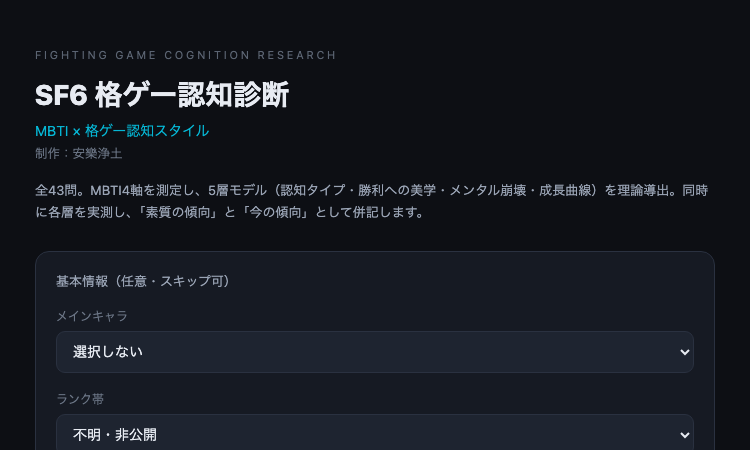
格ゲー認知診断 格ゲー認知診断は、SF6プレイヤーの認知スタイルを全43問で分析する無料の診断ツールです。ここでは、格ゲー認知診断の受け方をステップごとに紹介します。 ステップ1:基本情報を入力(任意) 格ゲー認知診断では、最初に基本情報を入力できますが、すべて任意でスキップも可能です。メインキャラはルーク、ジェイミー、キンバリー、マノン、春麗、ガイル、ケン、ブランカ、ザンギエフ、ジュリ、リュウ、キャミィ、ラシード、豪鬼、ベガ、テリー、不知火舞など全キャラクターに対応しています。ランク帯は「不明・非公開」から「MR2100以上」まで選べるので、ランクを公開したくない人でも安心です。 ステップ2:全43問に回答 診断が始まると、格ゲー認知診断は全43問の質問を出します。各質問は格闘ゲームの実戦場面に基づいて設計されており、普段のプレイを思い浮かべながら直感で答えるのがおすすめです。所要時間は数分程度です。 ステップ3:5層モデルの結果を受け取る 回答が完了すると、格ゲー認知診断は結果を表示します。1層目はMBTI16タイプ×格ゲー認知スタイル、2層目は観察・圧力・直感・反応の4つの認知傾向、3層目は勝利への美学、4層目はメンタルの崩れ方、5層目は成長曲線です。それぞれ「素質の傾向」と「今の傾向」の両方で表示されるのがポイントです。 ステップ4:結果を読み解く 素質の傾向とは、あなたが本来持っている認知スタイルです。今の傾向とは、現在のプレイで発現しているスタイルです。この二つの差に気づくことで、「自分は実は観察型なのに、最近は圧力型のプレイをしている」といった気づきが得られます。トレーニングで直したい部分、伸ばすべき部分が明確になります。 格ゲー認知診断は無料で、アカウント登録も不要です。スマホでもPCでもブラウザさえあればすぐに始められます。自分の認知スタイルを知りたいSF6プレイヤーなら、まずは一度、全43問に挑戦してみてください。きっと新しい自分が見つかるはずです。
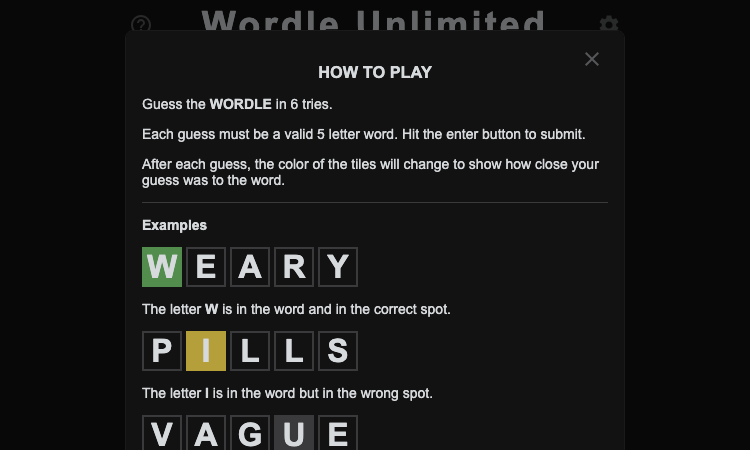
Wordle Unlimited Github Io
Wordle Unlimited Github Io — play endless Wordle puzzles online for free, without waiting for the next day.
Wordle Unlimited Github Io Wordle Unlimited Github Io is a free word puzzle game that lets you play endless rounds of Wordle without waiting for the next day. If you have ever finished the daily Wordle and wished there were more, Wordle Unlimited Github Io is exactly what you have been looking for. Here is how to play. Step 1: Open the game. Wordle Unlimited Github Io runs entirely in your browser. There is nothing to download, no account to create, and no sign-up — open the page and the game is ready. Step 2: Guess a five-letter word. The game presents a hidden five-letter word, and you have six guesses to find it. Type your first guess and press enter. Wordle Unlimited Github Io follows the classic rules: green tiles for correct letters in the right place, yellow for correct letters in the wrong place, and gray for letters that are not in the word. Step 3: Use the feedback. Each guess narrows the possibilities. Pay attention to the colors, eliminate wrong letters, and refine your next guess. The feedback system in Wordle Unlimited Github Io is identical to the original Wordle, so any Wordle player knows exactly what to do. Step 4: Solve the word. Find the word within six guesses and the puzzle is complete. This is where Wordle Unlimited Github Io differs from the original: instead of ending the session, the game immediately gives you a new word — the moment Wordle Unlimited Github Io was built for. You can keep playing for as long as you like. Step 5: Play again, and again. The unlimited format of Wordle Unlimited Github Io is its superpower. Play one more round, or ten more rounds. Practice your strategy, learn new words, and improve your vocabulary with every puzzle. The FAQ highlights that endless five-letter word challenges help build vocabulary — a benefit the daily format cannot match, and a reason Wordle Unlimited Github Io is worth playing daily. Wordle Unlimited Github Io is free, works on school Chromebooks and classroom networks, and needs no installation. Whether you are a Wordle veteran or a first-time player, the game is instantly familiar and endlessly replayable. Open Wordle Unlimited Github Io, guess your first word, and keep going — the next puzzle is always waiting.
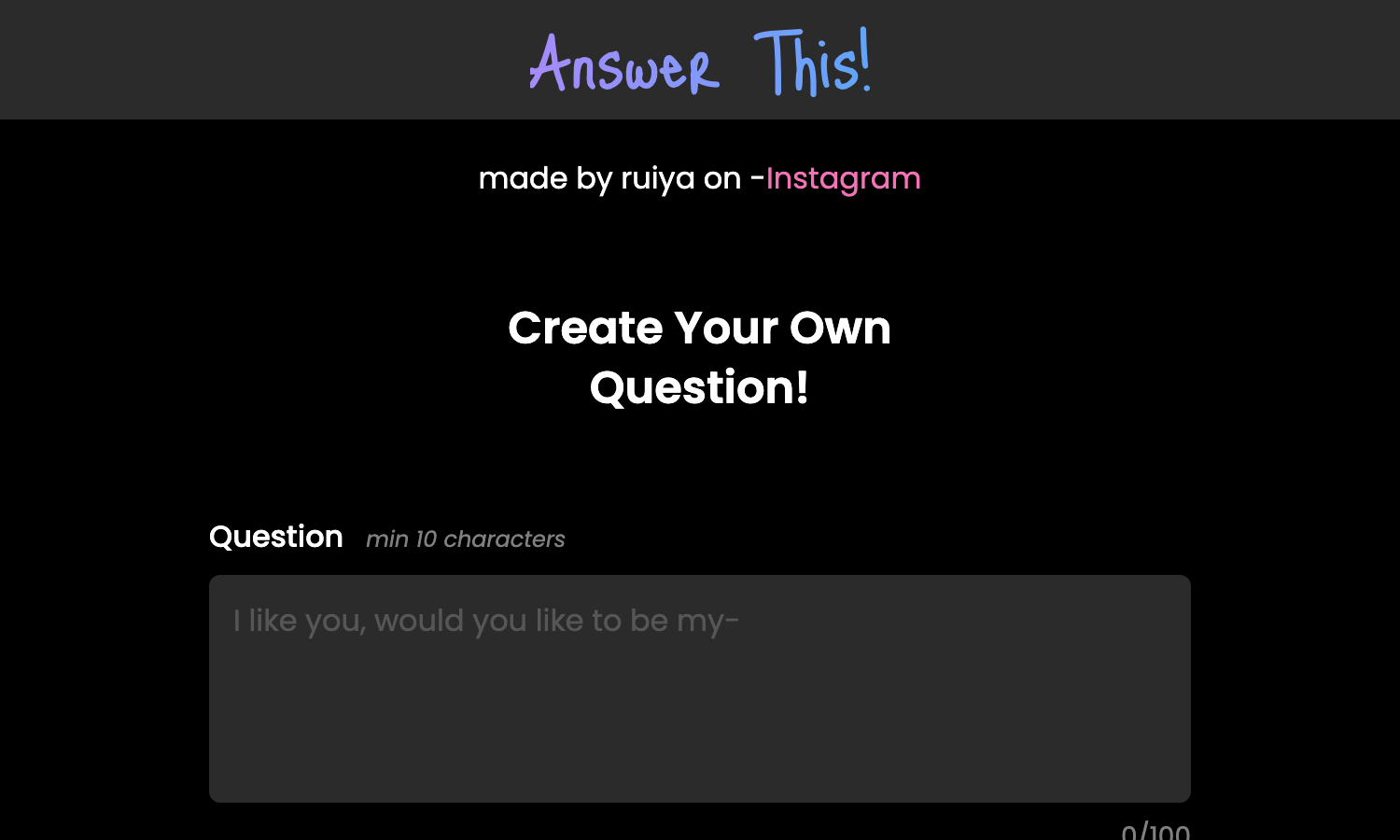
Answer This Vercel App
Answer This Vercel App — create a question with a result, generate a link, and share it with friends.
Answer This Vercel App Answer This Vercel App is a fun link generator where you create your own question, hide a result behind it, and share the link with anyone you like. When they answer, the result is revealed — and that surprise is the whole game. Here is how to use Answer This Vercel App. Step 1: Write your question. The builder in Answer This Vercel App asks for a question of at least 10 characters — for example, "Do you like me?" or "Are you scared right now?". You have up to 100 characters to make it perfect. Step 2: Set the answers. Answer This Vercel App gives you two answer buttons by default — "Yes" and "No" — each between 2 and 10 characters. You can customize them to fit your question, like "Absolutely" and "Never". Step 3: Write the result. This is where the magic happens. Answer This Vercel App lets you write a result message that appears after someone answers — "Hooray! Now you're mine!" is the default example. The result is what makes the whole thing fun: it is your punchline, your confession, your surprise. Step 4: Add a photo (optional). To make the reveal even better, Answer This Vercel App lets you upload an image (JPG, JPEG, or PNG) that shows up with the result. A photo of your face, a screenshot, a funny picture — the choice is yours. Step 5: Generate and copy the link. Click "Generate Link" in Answer This Vercel App, and a unique link appears. Click "Copy Link", send it to whoever you want, and wait. When they answer your question on Answer This Vercel App, they see the result you prepared. A few things make Answer This Vercel App stand out. It is completely free, with no account and no sign-up. It runs in the browser, so there is nothing to install. It is made by a small creator (you can find them on Instagram), and it shows — the tool is focused, fast, and designed for one purpose: making answer links that surprise. Answer This Vercel App is perfect for pranks, confessions, and inside jokes. Craft your question, set your result, and send the link. The look on their face — that is the payoff of Answer This Vercel App.

Pawai Nusantara Vercel
Pawai Nusantara Vercel — scan the QR on a decorated car and vote for your favorite in Indonesia's 81st parade.
Pawai Nusantara Vercel Pawai Nusantara Vercel is the voting platform for Indonesia's 81st Independence Day decorated car parade, and it is built around one of the simplest interactions possible: scan a QR code, submit a vote. If you are attending the Pawai Mobil Hias and want to support your favorite decorated car, Pawai Nusantara Vercel is exactly how you do it. Here is how the voting works. Step 1: Find your favorite decorated car. Pawai Nusantara Vercel is designed around the live parade experience. You watch the decorated cars pass by, pick the one that impresses you most, and remember where it is. There is no list to search on the site — the choice starts the moment you see the car in person. Step 2: Scan the QR code on the car. Every decorated car in the parade carries an official QR code. Open your phone's built-in camera, point it at the QR code, and tap the notification link that appears. You do not need to install any app — Pawai Nusantara Vercel works through the camera you already have. Step 3: Fill in your data and submit. Pawai Nusantara Vercel asks for a short form: your name and an active phone number, used for validation. You confirm your chosen car, then submit one vote. Pawai Nusantara Vercel reminds you that the vote is final and cannot be moved to another car, which keeps the competition fair and meaningful. Watch the leaderboard. Beyond voting, Pawai Nusantara Vercel includes a leaderboard so you can see which decorated cars are leading the public vote. That turns the independence day parade into a live competition, and it gives you a reason to check back as the celebration unfolds. A few things make Pawai Nusantara Vercel stand out. It is free for every voter. It works on any phone with a camera. It requires no app install. And it ties the digital vote directly to the physical parade — with Pawai Nusantara Vercel you scan the QR on the actual car you like. The whole experience carries the theme "81 Tahun Kemerdekaan Republik Indonesia," and Pawai Nusantara Vercel makes participating effortless. If you are at the parade, scan and vote with Pawai Nusantara Vercel; if you are at home, follow the leaderboard.