Newest Lovable Apps
Discover beautiful apps crafted with vibe coding across different categories. Explore our curated collection of lovable applications.
Categories

195-0 World Draft
Draft your dream cabinet and see how many of the world's 195 nations you can conquer.
195-0 World Draft 195-0 is a free browser-based world conquest draft game where you build a five-person cabinet and discover how many of the world's 195 nations your regime can conquer. Each round gives you a new country and candidate category. Choose a public figure, assign them to the role where you think they will perform best, and build your cabinet across five quick rounds. How It Works Start a new draft with five open cabinet positions. Explore the country and candidate category for each round. Choose a candidate from the available pool. Assign them to the best strategic role. Complete your cabinet and reveal your final conquest score out of 195. Cabinet Roles Your cabinet includes: President Vice President General Propaganda Minister Treasurer Each role rewards different strengths, including leadership, authority, military experience, media influence, financial skill, and international diversity. Features Free to play No account required No download required Runs directly in your browser Five quick draft rounds Randomized candidate combinations Strategic role assignment Different results every game Final conquest score out of 195 Build the strongest—or most chaotic—cabinet you can and find out whether your team has what it takes to conquer the world.

a little box of goodies
a little box of goodies – Build a digital care package of notes, photos, songs and voice messages for someone special.
A Little Box of Goodies Official Website A Little Box of Goodies is a digital care package builder that turns notes, photos, songs and voice messages into a shareable parcel for someone you care about. Official app: https://alittleboxofgoodies.com/ Creator: from.collette (Instagram) Price: Paid (one-time payment to generate the share link) Login required: No (your email is only used to deliver the package link) Platform: Web (hosted on Vercel) Main use: Sending a personalized digital care package to someone special Last checked: 2026-08-23 Visit A Little Box of Goodies We are not the official developer of A Little Box of Goodies. This page helps users find, understand, and use the product. What Is A Little Box of Goodies? A Little Box of Goodies is an online gift builder styled like a vintage shipping label and a shop receipt. Instead of texting a plain "thinking of you", you assemble a parcel: write the recipient's name on a paper label, choose what to tuck inside — a note, a photo, a song, a video, a voice recording, a hand drawing, a map location, a coupon or a news link — and then pay to generate a private link. The recipient opens the link, taps a wrapped box to unwrap it, and goes through each item one by one. It solves the problem of long-distance affection: sending care across time zones, cheering up a homesick friend, or marking a birthday you cannot attend in person. What makes it different from a photo collage or a messaging app is the ritual — the receipt-style checklist, the unwrapping moment, and the keepsake link — which makes receiving it feel closer to opening a real gift than scrolling a chat. How to Use A Little Box of Goodies Open the official A Little Box of Goodies website. Fill in the "to / title" and "from / your name" fields on the shipping label. Pick the items to tuck inside and add your content (text, uploads, links, drawings, voice clips). Click "Pay & Generate Link", complete the checkout, and copy the package link to send to your person. Is A Little Box of Goodies Safe? The site does not require an account or a Google / Discord social login; you only provide an email so the package link can be sent to you after payment. Uploaded photos and voice clips are stored only as part of the package you create. Payment is handled through a Stripe-style checkout session, so the site itself never asks for card details. The site runs on Vercel, uses HTTPS, and shows no visible ads or redirects. The main things to keep in mind: the share link is effectively public to anyone who has it, and the payment step happens before the link is generated. Why Is A Little Box of Goodies Popular? A Little Box of Goodies appears to be gaining attention through direct sharing and word-of-mouth, although there is no clear public source showing where the trend originated. A Little Box of Goodies Not Working? If A Little Box of Goodies cannot be reached, you can try: Refresh the page. Open it in another browser. Disable ad blockers temporarily. Check whether the original Vercel deployment is still online. Try again later if the developer is updating the app. If the original site is confirmed down: The original A Little Box of Goodies website appears to be unavailable as of 2026-08-23. A Little Box of Goodies Alternatives If you like the idea of sending personal digital gifts, you can also try: Kudoboard — a group board where friends collect messages, photos and GIFs for someone Cameo — personalized video messages from creators and celebrities GroupGreeting — a group greeting card that everyone signs online Frequently Asked Questions What is the official A Little Box of Goodies website? The official website is https://alittleboxofgoodies.com/. Is A Little Box of Goodies free? Building and previewing a package is free, but generating the shareable link requires a one-time payment. Do I need an account to use A Little Box of Goodies? No account or social login is required; an email is used only to deliver your package link after payment. Who created A Little Box of Goodies? It was created by the Instagram creator from.collette. Is A Little Box of Goodies still available? Yes — the site was online and functional as of 2026-08-23.

Video To Link
Convert video or image files into free, shareable links with optional password protection, expiry, and analytics.
Video to Link turns videos and images into short, shareable URLs. Drop a file onto the page and you’ll receive a videotolink.net link within seconds. There’s no processing queue or transcoding stage—the conversion happens as the file uploads, so the link is ready the moment the progress bar finishes. It’s designed for situations where sending the file itself simply doesn’t work. Email attachments get rejected, messaging apps compress clean exports until they look blurry, and shared-drive folders often force viewers to sign in or request access before they can watch a forty-second clip. For video, the service supports MP4, MOV, WebM, MKV and M4V. For images, it accepts JPG, PNG, WebP and GIF. Files are never re-encoded or recompressed: the bytes delivered are the same ones you uploaded. A colour-graded export keeps its grading, screen-recording text remains readable, and photos retain their full resolution instead of being resized by a messaging app. Opening the link takes the viewer to a clean page containing only the file. There are no ads, related-content feeds, sign-up walls or apps to install. Videos stream progressively and support seeking, images display at their original resolution, and a download button is available for anyone who needs the source file. Share the link in Slack, Discord, WhatsApp or X and it expands into a preview card, with inline playback wherever the platform supports it. Every shared link remains under your control. You can add a password or expiration date, and either change takes effect on the very next visit—not after a delayed cleanup process. Deleting a file from your library disables its link immediately. Files are never publicly listed, there are no browse pages or user profiles to search, and file pages are excluded from search engines. The link itself is the only way in. Teams use it to share screen recordings and walkthroughs. Developers and QA teams attach reproduction videos to tickets and pull requests. Sellers use it to demonstrate products inside listings, freelancers and job seekers place reels behind a single clean link in proposals, and teachers share lesson recordings without asking students to join another platform. The service is free and does not require an account. Creating a free account makes your links permanent and gives you a personal library where you can rename, search and delete files, as well as track how many times each link has been opened or downloaded.
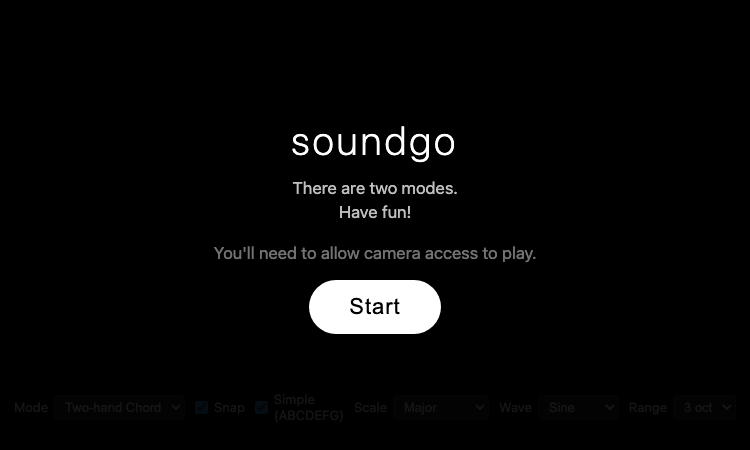
Soundgo
Soundgo - Play chords and melodies with your hands through your webcam. Free browser instrument, no install.
Soundgo Official Website Soundgo is a webcam-based music instrument that lets you play chords and melodies with your hands. Official app: https://sound.gojaehyun.com/ Creator: Go Jaehyun (portfolio: gojaehyun.com) Price: Free Login required: No Platform: Web (gojaehyun.com subdomain) Main use: Playing music by moving your hands in front of a webcam Last checked: 2026-08-22 Visit Soundgo We are not the official developer of Soundgo. This page helps users find, understand, and use the product. What Is Soundgo? Soundgo is a browser instrument that turns your webcam into a musical interface: you play chords and melodies by moving your hands in the air. The site uses Google's MediaPipe Hands to track your fingertips in real time and Tone.js to synthesize the sound, so there is no instrument to buy and nothing to install — just a camera and a browser. The interface shows two circular "wheels" on screen: one for chords and one for melody, and your fingertips act as cursors over them. The app offers two modes: "Two-hand Chord" and "Melody + Chord". You can pick a scale (Major, Pentatonic, Minor, Blues, or Chromatic), a waveform (Sine, Triangle, Saw, or Square), and a range of 2, 3, or 4 octaves. The developer tuned the tracking carefully — fingertip positions are smoothed so your hand does not misfire, and chord changes are debounced so a fingertip resting on a boundary does not flicker. The UI is bilingual (English and Korean), and the app asks for camera permission before it starts. How to Use Soundgo Open the official Soundgo website. Click "Start" and allow camera access when the browser asks. Choose a mode: Two-hand Chord or Melody + Chord. Pick a scale, waveform, and octave range from the controls. Move your hands in front of the webcam — your fingertips hover over the on-screen wheels to play chords and melodies. Is Soundgo Safe? What can be verified about Soundgo: it is a static web page on the gojaehyun.com domain, the personal site of developer Go Jaehyun. There is no registration, no third-party login, no payment, and no file upload. The app requires webcam access — that is its whole purpose — and the camera feed is processed locally in the browser using MediaPipe's client-side hand tracking; the page loads its libraries from the jsDelivr CDN. The site has no ads and no redirects. The only privacy consideration is the camera permission itself: the app cannot work without it, and you should only grant it if you are comfortable with webcam use. Why Is Soundgo Popular? Soundgo appears to be gaining attention through direct sharing and word-of-mouth, although there is no clear public source showing where the trend originated. The concept is inherently shareable — playing music with your hands in the air looks like magic on video, and the "webcam instrument" idea fits the wave of AI-powered and gesture-based web experiments. It is also a polished personal project by a developer with a public portfolio, which makes it easy to link and recommend. Soundgo Not Working? If Soundgo cannot be accessed, try: Refresh the page. Open it in another browser. Allow camera access in the browser permission prompt — the app cannot work without it. On mobile, rotate your device to landscape; the app requires landscape orientation. Check whether the sound.gojaehyun.com site is still online. Soundgo Alternatives If you like Soundgo, you can also try: Chrome Music Lab — free browser experiments for making music with your mouse or touch Piano Genie — Google's AI piano game where any key press plays something musical Theremin — the classic instrument played by moving your hands near an antenna Frequently Asked Questions What is the official Soundgo website? The official website is https://sound.gojaehyun.com/. Is Soundgo free? Yes, Soundgo is completely free to use with no payment step anywhere. Do I need an account to use Soundgo? No. There is no registration or login — you only need to allow camera access. Who created Soundgo? Soundgo was created by Go Jaehyun, a developer whose portfolio is at gojaehyun.com. Is Soundgo still available? Yes, the site was online and playable as of 2026-08-22.

Longruay
Longruay - Live like a millionaire for 30 days: AI life simulation, US$100 million, one wealth decision per day.
Longruay Official Website Longruay is a 30-day millionaire simulator and AI life simulation game. Official app: https://longruay.com/ Creator: Not publicly listed (contact: contact@longruay.com) Price: Freemium — first AI-powered month free, then credits from $1.99 Login required: Yes (Google or email sign-in) Platform: Web (longruay.com) Main use: Wealth decision game — manage US$100 million through one choice per day for 30 days Last checked: 2026-08-22 Visit Longruay We are not the official developer of Longruay. This page helps users find, understand, and use the product. What Is Longruay? Longruay is a browser game that answers a fun question: what would you actually do with US$100 million? You start with that exact sum and play through 30 fictional days, making one wealth decision per day — buy the house, finance the acquisition, protect the team, or walk away. The site describes itself as "an AI life simulation", because each day brings a private briefing from Mira, an AI chief of private office who presents investments, acquisitions, invitations, and crises around your current story. Longruay is built to feel consequential. The homepage shows a sample day: "DAY 17 / 30, US$108.4M — The harbor hotel: a beautifully run independent hotel needs a patient new owner" with three choices (acquire with disciplined debt, bring in an operating partner, or protect liquidity and walk away). The company emphasizes that AI writes the briefings but never decides the results — a deterministic engine calculates every financial and personal consequence against visible, tested rules. At the end of the month you receive a private report with a full balance sheet, five personal metrics, and an outcome title like "empire builder", "cultural patron", "quiet sovereign", or "golden cage". How to Use Longruay Open the official Longruay website. Click "Enter your private office" or "Start with US$100 million". Choose one of three identities: Tech Founder, Family Wealth Heir, or Global Investor. Read the daily briefing from Mira and pick one of the choices each day, for 30 days. Collect your final report with the balance sheet, personal metrics, and outcome title. Is Longruay Safe? What can be verified about Longruay: the site is a web game run on longruay.com, with Terms, Privacy, and Contact pages in the footer and a contact email (contact@longruay.com). The FAQ states explicitly that the game is "a fictional wealth decision game for entertainment" and is not real financial advice — all companies, assets, prices, and people are invented. Payment is only for credits (one-time purchases from $1.99, no auto-renewal, credits never expire), and the site promises that a month can always be finished for free using handcrafted scenarios. The game requires personal choices but no file uploads. It appears to be a paid/hobby project with a transparent pricing page rather than an anonymous ad-supported site. Why Is Longruay Popular? Longruay appears to be gaining attention through direct sharing and word-of-mouth, although there is no clear public source showing where the trend originated. The premise is strong for sharing — "live like a millionaire for 30 days" — and each run ends with a personal verdict ("quiet sovereign" with a US$116M balance) that players screenshot and compare. The mix of a visible simulation engine with personalized AI briefings also gives the game a "cool AI product" angle that has been trending in 2026. Longruay Not Working? If Longruay cannot be accessed, try: Refresh the page. Open it in another browser. Disable ad blockers temporarily. Check whether the longruay.com site is still online. Try again later if the developer is updating the game. Longruay Alternatives If you like Longruay, you can also try: BitLife — a life-simulation game where every choice changes your character's fortune AdVenture Capitalist — a money-management idle game about growing wealth The Sims — a life simulation where you manage your sim's career, home, and relationships Frequently Asked Questions What is the official Longruay website? The official website is https://longruay.com/. Is Longruay free? It starts free: the first complete AI-powered month is included. After that, AI briefings cost 2 credits each, with one-time packs from $1.99 (200 credits). Handcrafted scenarios and failed AI requests are always free. Do I need an account to use Longruay? Yes — the game continues across devices, which requires an account/session. Registration is simple and the first month is free. Who created Longruay? The developer is not publicly identified; the site offers contact at contact@longruay.com. Is Longruay still available? Yes, the site was online and playable as of 2026-08-22.
SpiderFoot OSINT Tool
SpiderFoot OSINT. See the wider footprint.
SpiderFoot is a free online OSINT tool for investigating usernames, email addresses, IP addresses and public information. Use SpiderFoot online without installing the software.

Longruay Vercel App
Longruay Vercel App - Free fantasy shopping: try being rich for 5 minutes, checkout with no real payment.
Longruay Vercel App Official Website Longruay Vercel App is a Thai-language fantasy shopping site where you can "try being rich for 5 minutes". Official app: https://longruay.vercel.app/ Creator: Not publicly listed (Vercel deployment, "Powered by RAMO" in footer) Price: Free Login required: No Platform: Web (Vercel) Main use: Browsing luxury items, adding them to a cart, and checking out without real payment Last checked: 2026-08-22 Visit Longruay Vercel App We are not the official developer of Longruay Vercel App. This page helps users find, understand, and use the product. What Is Longruay Vercel App? Longruay Vercel App is a "fantasy shopping" website in Thai — the tagline translates to "Try being rich for 5 minutes". The idea is simple: you browse luxury objects, add them to a cart, and press checkout, but no real money is ever charged and nothing is ever delivered. The site is upfront about this: "No real payment, no real delivery — LongRuay is a fantasy shopping space for trying the feeling, not taking on real burdens." The catalog holds 36 fantasy objects spread across 5 "rich lives" you can try on: Bangkok Power (sky residences and long cars), Coastal Escape (cliffside villas and resort bags), Old Money Weekend (estate homes and weekend cars), Midnight Status (black supercars and night duplexes), and Impossible Wealth (private vehicles and orbital penthouses). Items include a Sathorn Sky Residence at ฿79,000,000, an Andaman Private Villa at ฿96,000,000, a Vanta R Midnight supercar at ฿14,500,000, and a Fifth Horizon Address at ฿336,000,000. The cart can mix items across all five worlds, and a "surprise me" button picks a random rich life for you. How to Use Longruay Vercel App Open the official Longruay Vercel App website. Click "เข้าแคตตาล็อก" (Enter Catalog) to browse the 36 fantasy objects, or click "สุ่มให้เลย" (Surprise Me) for a random pick. Choose one of the 5 modes (Bangkok Power, Coastal Escape, Old Money Weekend, Midnight Status, Impossible Wealth) to filter the catalog. Click "ใส่ตะกร้า" (Add to Cart) on any item, then open the cart and press checkout — no payment is ever taken. Is Longruay Vercel App Safe? What can be verified about Longruay Vercel App: it is a static web app deployed on Vercel with no registration, no third-party login, and no payment step — the site explicitly states there is no login and no payment. Nothing is uploaded and no personal information is collected to make a purchase, because purchases are fictional. The site is in Thai and aimed at a general audience; the content is playful luxury fantasy with no ads or redirects on the pages we checked. The developer is not publicly identified (the footer credits "RAMO" as the platform), so treat it as an anonymous hobby project — fun and low-risk, but with no support guarantees. Why Is Longruay Vercel App Popular? Longruay Vercel App appears to be gaining attention through direct sharing and word-of-mouth, although there is no clear public source showing where the trend originated. The concept is inherently shareable: "try being rich for 5 minutes" is a one-line pitch that works in group chats, and screenshots of absurd carts (a ฿336M penthouse plus a supercar) make easy social media content. The five themed "rich lives" also give the site a playful, aspirational angle that fits the current trend of fantasy-shopping and "what would you buy" games. Longruay Vercel App Not Working? If Longruay Vercel App cannot be accessed, try: Refresh the page. Open it in another browser. Disable ad blockers temporarily. Check whether the original Vercel deployment is still online. Try again later if the developer is updating the app. Longruay Vercel App Alternatives If you like Longruay Vercel App, you can also try: Farfetch — a real luxury fashion marketplace for browsing high-end items 1stDibs — a luxury design marketplace for furniture, art, and collectibles Sotheby's — a luxury auction house where you can browse extraordinary objects Frequently Asked Questions What is the official Longruay Vercel App website? The official website is https://longruay.vercel.app/. Is Longruay Vercel App free? Yes, the site is completely free — no payment is ever taken, because the shopping is fantasy. Do I need an account to use Longruay Vercel App? No. The site explicitly states there is no login and no payment. Who created Longruay Vercel App? The developer is not publicly listed. The site is deployed on Vercel and credits "RAMO" in the footer. Is Longruay Vercel App still available? Yes, the site was online and playable as of 2026-08-22.
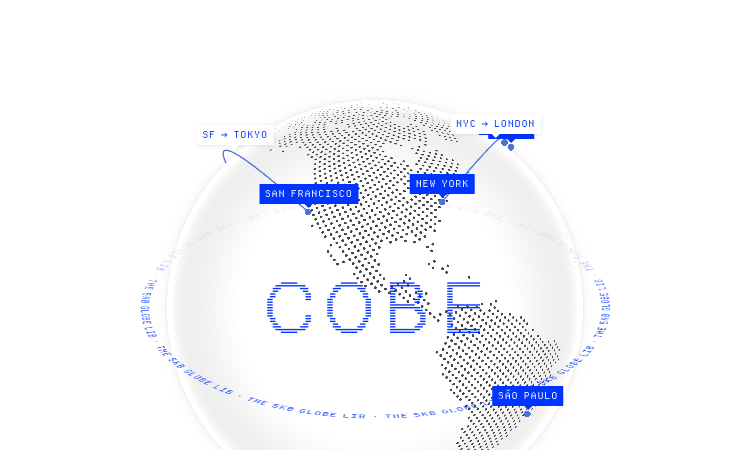
Cobe Js
Cobe Js - The 5KB WebGL globe library by Vercel's Shu Ding: 3D globes for React, Vue and Svelte. MIT licensed, free.
Cobe Js Official Website Cobe Js is a tiny 5KB WebGL globe library for the web, developed by Vercel's Shu Ding. Official app: https://cobe.vercel.app/ Creator: Shu Ding (@shuding, Vercel CTO, creator of SWR) Price: Free (open source, MIT License) Login required: No Platform: Web (Vercel + npm library) Main use: Adding interactive 3D globe visualizations to React, Vue, or Svelte apps Last checked: 2026-08-21 Visit Cobe Js We are not the official developer of Cobe Js. This page helps users find, understand, and use the product. What Is Cobe Js? Cobe Js is a JavaScript library that renders a photorealistic 3D globe entirely in WebGL, in a bundle that stays around 5KB. The official page is both a live demo and documentation: it shows a rotating globe with glowing city markers (San Francisco, New York, Tokyo, London, Sydney and more), animated flight arcs between cities, and 13 preset scenes covering labels, satellites, weather, analytics-style data points, and even a "live badge" mode. Developers search for "cobe js" because it is one of the smallest ways to put a striking globe visualization into a web app. The library is used through a single function: createGlobe(canvas, options), where options control devicePixelRatio, size, rotation (phi/theta), lighting, base color, marker color, and glow. The demo site shows real usage code, plus CodeSandbox and StackBlitz examples for React, Vue, and Svelte, and the project ships as an npm package installable with one command. How to Use Cobe Js Open the official Cobe Js website at https://cobe.vercel.app/ to see the live globe demos. Install the library in your project with npm install cobe (or use the CDN link shown on the site). Import it in your component with import createGlobe from 'cobe'. Call createGlobe(canvas, { width, height, ... }) in a useEffect, copy the config from the demo, and pass your own marker data. Is Cobe Js Safe? Cobe Js is a well-known open-source library: the code is public on GitHub (github.com/shuding/cobe, MIT license, over 5,600 stars), so anyone can inspect exactly what it does. The library only renders WebGL on a canvas you give it; it does not collect data, require accounts, or send anything to a server. The demo page runs entirely in the browser on Vercel's hosting. The creator is Shu Ding, a well-known web developer at Vercel (co-creator of Next.js and SWR). The main thing to keep in mind is that cobe is a rendering library, not a data provider — you supply your own markers and colors. Why Is Cobe Js Popular? Cobe Js gained popularity in the developer community because it made 3D globes practical: it is a 5KB dependency, released by a well-known developer (creator of SWR and Next.js core contributor) at Vercel, and it looks spectacular with almost no code. The demo site with its animated flight paths and glowing cities spread widely on X/Twitter — the author's tech thread about the rendering details went viral — and the project now has over 5.6K stars on GitHub. The "5KB WebGL globe" hook is what makes people search for it and share it. Cobe Js Not Working? If Cobe Js fails to render, try: Refresh the page — the WebGL context sometimes needs a reload. Open it in another browser; older browsers without WebGL support cannot run it. Check that your device has hardware acceleration enabled in browser settings. Verify the Vercel deployment at cobe.vercel.app is still online. For your own project, make sure you created the canvas element before calling createGlobe and that the container has a set size. Cobe Js Alternatives If you like Cobe Js, you can also try: globe.gl — a larger, feature-rich WebGL globe library for data visualization react-globe.gl — a React wrapper around globe.gl for data-driven globes three-globe — a Three.js addon for full 3D globe scenes with more control Frequently Asked Questions What is the official Cobe Js website? The official website is https://cobe.vercel.app/, with source code on GitHub at github.com/shuding/cobe. Is Cobe Js free? Yes, the library is open source under the MIT license and free to use, including in commercial projects. Do I need an account to use Cobe Js? No. The library works offline in your own project, and the demo site requires no account, sign-in, or payment. Who created Cobe Js? Cobe Js was created by Shu Ding (@shuding), a web developer at Vercel known for creating SWR and contributing to Next.js. Is Cobe Js still available? Yes, the library is actively maintained — the GitHub repository was updated recently and the demo site is online as of 2026-08-21.
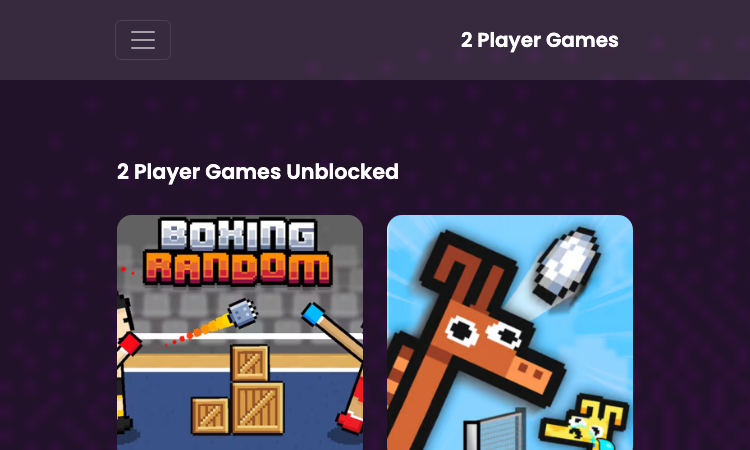
2 Player Github Io
2 Player Github Io - Free 2-player browser games: fullscreen, ad-free, no downloads, no login. Bad Ice-Cream 2 & more.
2 Player Github Io Official Website 2 Player Github Io is a free browser portal of two-player games hosted on GitHub Pages. Official app: https://2player-online.github.io/ Creator: Not publicly listed (GitHub Pages site) Price: Free Login required: No Platform: Web (GitHub Pages) Main use: Playing two-player browser games with a friend on one keyboard Last checked: 2026-08-21 Visit 2 Player Github Io We are not the official developer of 2 Player Github Io. This page helps users find, understand, and use the product. What Is 2 Player Github Io? 2 Player Github Io is a static game portal that collects two-player browser games you can start in seconds. The whole site runs on a github.io domain, which means there is no installer, no launcher, and no account system — you open the page, pick a game, and it loads inside the browser window. That is the entire pitch, and it holds up in practice: from the homepage you can jump straight into titles like Bad Ice-Cream 2, Stick Fighter, Wrassling, ZOOM-BE 3, and Ludo Multiplayer without ever leaving the tab. The layout is a straightforward grid of game thumbnails. Clicking any thumbnail on 2 Player Github Io opens a dedicated game page with a fullscreen button, so the game expands to fill your monitor instead of sitting in a small embedded frame. There is no sign-up wall anywhere — no email field, no Google login, no "create an account to continue" popup. You simply arrive and play, which is exactly what most people want from a quick two-player session. How to Use 2 Player Github Io Open the official 2 Player Github Io website. Pick a game from the thumbnail grid on the homepage, or use the category menu (2 Player, Car, Sports, Racing, Stickman, Puzzle, and more) to narrow the list. Click the game thumbnail to open its dedicated page. Press the fullscreen button if you want the game to fill the whole monitor, then start playing with a friend on the same keyboard. Is 2 Player Github Io Safe? Based on what is verifiable on the site itself: 2 Player Github Io requires no registration and no third-party login, does not ask for payment, and does not collect files or personal information — it is a static GitHub Pages site with no backend. The site advertises itself as ad-free, and the pages we checked show no pop-up ads or redirect chains. The games load from a companion github.io host via iframes. There is also a DMCA page, which suggests the operator takes content takedowns seriously. As with any free game site, we cannot guarantee the behavior of every embedded game, so treat it as a low-risk but not zero-risk environment. Why Is 2 Player Github Io Popular? The "github io" pattern is well known among browser gamers: github.io sites are fast, free, and require nothing to install, so they spread quickly through direct link sharing in classrooms, group chats, and social media. 2 Player Github Io appears to be gaining attention through direct sharing and word-of-mouth, although there is no clear public source showing where the trend originated. 2 Player Github Io Not Working? If 2 Player Github Io cannot be accessed, try: Refresh the page. Open it in another browser. Disable ad blockers temporarily. Check whether the original GitHub Pages deployment is still online. Try again later if the developer is updating the site. 2 Player Github Io Alternatives If you like 2 Player Github Io, you can also try: Fireboy and Watergirl (Poki) — the classic two-player cooperative puzzle series Tank Trouble — a chaotic 2-3 player tank battle game in the browser 1v1.lol — a popular browser shooter with head-to-head duels Frequently Asked Questions What is the official 2 Player Github Io website? The official website is https://2player-online.github.io/. Is 2 Player Github Io free? Yes, all games on 2 Player Github Io are free to play with no payment step anywhere on the site. Do I need an account to use 2 Player Github Io? No. The site has no registration, no email field, and no third-party login. Who created 2 Player Github Io? The developer is not publicly listed. The site is hosted on GitHub Pages, and the game files are served from a companion github.io account. Is 2 Player Github Io still available? Yes, the site was online and playable as of 2026-08-21.

ImageVids AI
ImageVids AI turns static images into AI-generated videos with free trial credits, multiple video models.
ImageVids AI is an AI image-to-video generator designed to help creators, marketers, ecommerce sellers, designers, and storytellers transform static images into dynamic AI-generated videos. Users can upload a photo, product image, portrait, anime artwork, landscape, or visual concept, then describe the motion they want with a simple prompt. The platform supports multiple AI video models, flexible aspect ratios, prompt-based motion control, and free trial credits for new users. It is useful for creating product videos, social media clips, portrait animations, anime videos, marketing visuals, real estate videos, travel content, and short-form videos for TikTok, Reels, and YouTube Shorts. ImageVids AI focuses on making image-to-video generation easier to test and refine. Users can start with free credits, compare different models, adjust prompts, and upgrade when they need more credits, HD exports, watermark-free downloads, or commercial use.

Yks2026 Vercel
Yks2026 Vercel — search and filter 12,238 Turkish university programs by score, faculty, and quota.
Yks2026 Vercel Yks2026 Vercel is a free Turkish university program search tool for YKS 2026, covering 12,238 undergraduate programs with their base and ceiling scores. If you are building your tercih (preference) list this year, Yks2026 Vercel is the fastest way to see what is available. Here is how to use it. Step 1: Open the database. Yks2026 Vercel opens directly to "2026 Lisans Programları" — the full list of 2026 undergraduate programs. The counter on Yks2026 Vercel shows all 12,238 programs, and the list is already sorted by score, highest first. Step 2: Set your filters. Use the Filtreler (filters) panel on Yks2026 Vercel to narrow the list. Choose the university type (all, state, or private), search by keyword, or pick specific universities, faculties, and departments — each has its own search box. You can also set a minimum and maximum score range and choose the score type. Step 3: Sort the results. Yks2026 Vercel sorts results in eight ways: score descending or ascending, and university, faculty, or department in alphabetical order (A–Z or Z–A). Switch the sort to match how you like to compare programs. Step 4: Read the program card. Each result on Yks2026 Vercel shows everything you need: university, faculty, program name, type (public/private), score type, quota, the taban puan (base score), the tavan puan (ceiling score), and the official program code. Step 5: Build your list. With the filters on Yks2026 Vercel, you can quickly find every program that matches your score and interests. The tool runs in any browser, works on mobile, and requires no account. A few things make Yks2026 Vercel stand out. It is completely free, with no paywall. It covers the full YKS 2026 dataset on Yks2026 Vercel — 12,238 programs — not a sample. It is designed around real student needs: score filters, program codes, quotas, and easy sorting. And it is fast, because the database is right in the browser. If you are a student applying to universities in Turkey for 2026, Yks2026 Vercel is worth bookmarking today. Set your score range, filter the programs, and build your preference list with confidence.

Age Of Discovery2 Vercel
Age Of Discovery2 Vercel — a 3D globe with ocean and ship, plus five cinematic cameras to explore the world.
Age Of Discovery2 Vercel Age Of Discovery2 Vercel is a 3D ocean and globe scene inspired by the Age of Discovery, where a ship crosses the sea and a cinematic camera lets you follow it. It is a free browser experience — open the page, and you are exploring. Here is how to use Age Of Discovery2 Vercel. Step 1: Open the scene. Age Of Discovery2 Vercel loads directly in your browser. No account, no install, no loading screens — the 3D scene appears immediately. The globe, the ocean, and the ship are rendered in real time with WebGL on Age Of Discovery2 Vercel. Step 2: Use the camera moves. Age Of Discovery2 Vercel gives you five cinematic camera buttons. 俯冲 (dive) plunges the camera toward the water. 长降 (long descend) glides the view downward in a long smooth path. 环绕 (orbit) circles the camera around the scene to see it from every angle. 掠过 (swoop) sweeps low past the surface for a fast, thrilling pass. 超变焦 (hyperzoom) pulls the camera in dramatically, like a broadcast zoom. Step 3: Watch the ocean move. The water in Age Of Discovery2 Vercel is not a flat texture — it is a shader-driven ocean with waves, crests, and specular highlights. The engine settings behind the scene include wave crest sharpness, slope variance, and highlight variance, which is why the sea looks alive rather than painted. Step 4: Explore at your own pace. There is no goal, no timer, and no score on Age Of Discovery2 Vercel. The point is the journey: pick a camera move, watch the scene from a new angle, and imagine the sailors of the Age of Discovery looking at the same open water centuries ago. Step 5: Try it on any device. Age Of Discovery2 Vercel works on desktop and mobile browsers. The camera buttons of Age Of Discovery2 Vercel are large enough to tap on a phone, and the scene scales to any screen. Age Of Discovery2 Vercel is free, fast, and cinematic. It is the age of discovery rendered in WebGL — one scene, one ship, one ocean, and five ways to see it. Open the page, choose a move, and explore.