Newest Lovable Apps
Discover beautiful apps crafted with vibe coding across different categories. Explore our curated collection of lovable applications.
Categories
Melodank
Melodank turns your personal memories, messages, and special occasions into a unique German song you can preview, person
Melodank turns personal memories into meaningful German songs that can be given as unique digital gifts. Users simply share a story about someone special, including their name, shared memories, the occasion, and a personal message. Melodank’s AI then creates a complete German song lyric based on that story. Before any music is generated, users can read and edit the full lyrics to correct names, relationships, details, or wording. Once the lyrics are approved, the system creates two different musical versions, each with a 60-second preview. Users can listen to both versions, choose their favorite, and unlock the complete song with a Song-Credit. The finished song includes a cover image, a personal message, the approved lyrics, and a private gift page that can be shared without requiring the recipient to create an account. Users can also manage, change, or deactivate their private gift link. Melodank is designed for birthdays, weddings, anniversaries, thank-you gifts, and other meaningful occasions. Instead of giving a generic card or ordinary present, users can give someone a song built around their own story—making the gift personal, emotional, and truly one of a kind.
Gratitude App Mobile
A simple gratitude summary.
Gratitude App Mobile A description that is over 200 words in length written in markdown form to comply with the directory submission requirements for all nine sites. We need to write many words to comply with the rule. This content expands on the gratitude concept, journaling habits, and daily affirmations to deliver a thorough explanation of the product to readers of the directory.
Gratitude App
Gratitude App - Android gratitude journal with prompts, affirmations, and vision boards.
Gratitude App Gratitude App is a private self-care journal for Android that helps users build a healthy gratitude practice. Published as com.northstar.gratitude and developed by Northstar (gratefulness.me), the app combines a daily gratitude journal, affirmations, vision boards, and a Daily Zen inspiration feed into one mental wellness companion. Everything inside the app is private to the user, so journal entries, affirmations, and vision boards remain securely on-device. The journal is the core of the experience. Gratitude App sends reminders with prompts that nudge users to write what they are grateful for, photographs a memory to save alongside the text, and tracks a daily streak to reinforce the habit. Hundreds of prompts are built in so first-time journalers have plenty of starting points, and the design is intentionally calming so each entry feels like a quick daily ritual rather than a long writing task. Affirmations sit alongside the journal. The app ships with hundreds of positive affirmations that can be read silently or listened to. Users can also write personal affirmations, add background music, and record their own voice for a deeper, more personal affirmation library. The combination of reading, listening, and recording supports different moments of the day and makes affirmations feel more like a habit than a task. Vision boards translate those habits into a visual planning tool. Users can collect photos, quotes, and affirmations on multiple boards organized into sections, and Gratitude App can also stitch the chosen goals into a video montage with music for sharing or reflection. A Daily Zen feed rounds out the experience with gratitude quotes, motivation quotes, thought switch ideas, thank-you cards, blog articles, and real-life stories of mindset change. Gratitude App is offered as a free download with in-app purchases. It supports a wide range of languages and is positioned as a gentle self-care tool rather than a substitute for clinical mental-health advice. The app fits anyone building a self-love routine, journaling beginners, and people who want a private place to track personal growth.
Grok Imagine
Creative AI studio for video and image Create cinematic Grok Imagine Video from prompts, images, or clips Grok Imagine
Built for creators, marketers, and small businesses, Grok Imagine makes professional visual content easier to produce. Users can quickly turn ideas into social-ready videos, promotional images, product visuals, and creative concepts without installing software or learning complicated editing tools.
GififyAI
Gifify is an all-in-one AI visual platform. While our AI GIF Generator creates animations from text or images, you can n
Join millions using Gifify’s AI GIF Generator to turn text and photos into viral animations. Now expanded with AI Video Generation and AI Image Creation, our platform is your shortcut to professional visuals. No skills required—just pure creativity for GIFs, clips, and art.
Concepts App
Concepts App - Editable vector sketches, PDF import, presentation mode, and 200+ libraries.
Concepts App Concepts App is an infinite, flexible sketching platform built for visual thinkers. It treats every idea as a concept and gives writers, designers, architects, illustrators, and product teams a single canvas to capture notes, mind maps, mood boards, plans, and finished illustrations. The product has been named an Editors’ Choice selection on the Apple App Store, the Microsoft Store, and Google Play, and is published by TopHatch. Under the hood, every stroke on the canvas is an editable vector. Users can sketch with realistic pencils, pens, wire, and marker-style brushes that draw on a vector-raster hybrid, and they can adjust, recolor, or reposition any line without redrawing. The built-in color system uses designer COPIC colors licensed from Too Corporation and is paired with HSL and RGB color wheels. Precision tools such as grids, line smoothing, live snap, shape guides, real-world scale, and measurement keep expressive work accurate. Sharing and collaboration are first-class features. A built-in Presentation Mode lets users share the live canvas with teammates or clients during video calls, making the app useful as a remote whiteboard alongside tools like Zoom. Users can drop in PDF and image files, mark them up with annotations, and export the results through PDF, PNG, PSD, SVG, DXF (AutoCAD), and other formats. Object libraries, custom brushes, infinite layers, and custom grids support reusable design systems that move across projects. Pricing is flexible and varies by region. The free Basic tier provides an infinite sketchbook with five layers, COPIC/HSL/RGB color wheels, paper and grid types, and basic JPG exports. Pro adds more than 200 libraries and features for $4.99 per month or $29.99 per year, with a seven-day free trial. Essentials and add-on packs such as brushes, object libraries, and PDF exports are available as one-time purchases between $1.99 and $39.99 per item. Businesses can deploy managed Pro licenses, and qualifying schools can unlock the product free of charge. Concepts App is available on iOS, Windows, Android, and ChromeOS, with active development toward cross-platform parity. It is widely used for architecture, illustration, note-taking, product design, UI/UX design, visual thinking, and remote whiteboarding, particularly when paired with a stylus.
Gesture Synth Weld Vercel App
Gesture Synth Weld Vercel App - Browser synth where hand gestures play chords and pads.
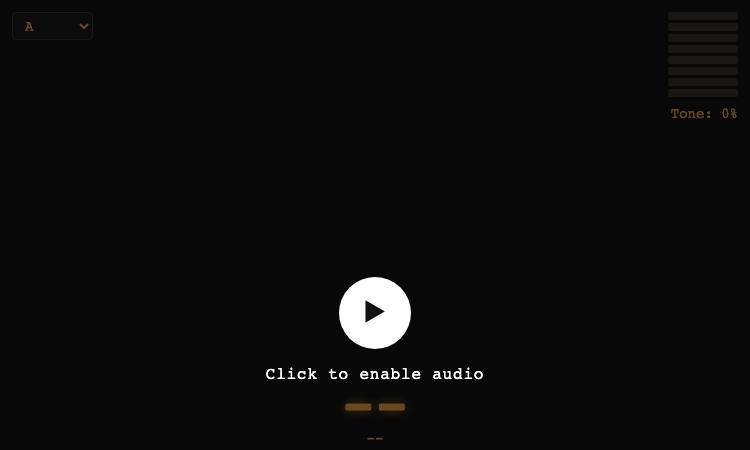
Gesture Synth Weld Vercel App Gesture Synth Weld Vercel App is a browser-based synthesizer that plays itself based on what your hands are doing. Powered by MediaPipe Hands gesture recognition and the Web Audio API, the experience turns webcam input into a continuous, gesture-driven musical performance. No MIDI controllers, virtual keyboards, or downloads are required. Open the page, click to enable audio, and start shaping sound with motion. The visual design is built around a dark stage that hosts the camera feed and an amber monospace HUD. The chord being played sits in large letters at the bottom of the screen, a vertical eight-bar volume meter climbs on the right, a tone read-out communicates the current distortion amount, and a density display shows how many notes are stacked. A small key selector in the corner lets visitors flip between the twelve chromatic roots, with A at 220Hz as the default. Sound generation happens entirely in the browser. The audio engine combines an oscillator bank, a low-pass filter with a sweeping cutoff, and a WaveShaper distortion node so the same gesture can swing between soft pads and aggressive leads. Recognised gestures map to scale-degree chords, and right-hand input can shift the voicing an octave up for instant fuller harmony. The instrument accepts up to two hands simultaneously. Open palms, closed fists, finger counts, and motion direction all influence chord selection, while two-handed gestures can stack dense chords or widen the harmony. Visitors can explore the instrument casually or treat the page as a stage for short performances because every gesture lands a note, and every silence is respected just as thoughtfully. Gesture Synth Weld Vercel App is ideal for sound designers prototyping camera-driven instruments, music educators looking for a tactile classroom demo, indie performers interested in hardware-free live sets, and curious users who want to play chords with their hands. Because the entire experience is hosted on Vercel, all you need is the URL and a webcam to begin performing.
Musefy - Free AI Music&Lyrics Generator
Musefy helps creators turn prompts into AI songs, lyrics, and background music online
Musefy is an AI-powered music studio for creators that turns simple content briefs into songs, background music, and lyrics for videos, podcasts, livestreams, games, and ads, then saves everything in one reusable asset library. Key Features AI Music Generator: Generate vocal songs or instrumental background tracks from plain-language prompts tailored to your content scenario. AI Lyrics Generator: Draft hooks, choruses, and full lyric ideas that can be carried directly into the music generator. Audio to MIDI & MIDI Editor: Convert audio ideas to MIDI and tweak arrangements inside a built-in editor for finer control. Creator-Centric Briefs: Start from ready-made prompts for YouTube intros, podcast themes, livestream loops, product ads, game trailers, and song demos. Saved Asset Workspace: Keep all finished songs and lyrics in “My Music” and “My Lyrics” for playback, download, and reuse across projects. How It Works Choose a creator brief: Describe your video, podcast, stream, game, ad, or song demo in natural language with the desired style and mood. Generate music or lyrics: Send your prompt (and optional lyrics) to create instrumental tracks, full songs, or standalone lyric drafts. Review and save assets: Store successful results in your workspace, then copy, download, and reuse them in future edits. Perfect For YouTube intros, vlogs, and short-form video openers.[page:1] Podcast themes, segment beds, and talk-show backgrounds. Livestream background loops and low-distraction BGM. Product launch spots, trailers, and promotional videos.[page:1] Songwriters and lyric-driven creators needing fast demos and idea drafts. Move from idea to creator-ready audio without opening a traditional DAW, and build a reusable sound library around your content workflow.
Codex Dream Skin
Codex Dream Skin — Reversible Themes for Codex Desktop
Codex Dream Skin is an independent open-source theme studio for Codex Desktop, using reversible local CDP injection on macOS and Windows.
Tarot Cua Bin Production Vercel App
Tarot Cua Bin Production Vercel App - Calm browser tarot with deep, focused, yes/no, and healing modes.
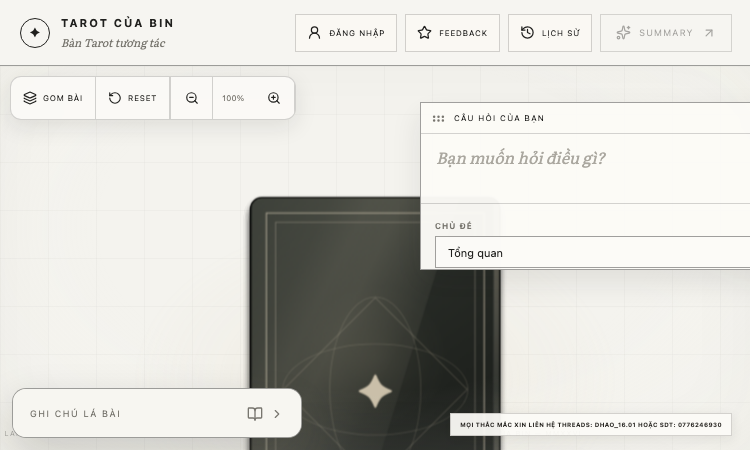
Tarot Cua Bin Production Vercel App Tarot Cua Bin Production Vercel App is a browser-based tarot table that turns a traditional three-card Past, Present, and Future reading into a calm, interactive ritual. Visitors land on a quiet wooden table layout, shuffle the deck by hand, and lay down three cards themselves before the system reveals a thoughtful interpretation of each position. The default spread is the classic three-card layout. Past reflects the patterns and lived experiences that shaped the present, Present describes the current state, the pressures at play, and how the visitor is reacting, and Future offers a conditional direction along with practical next steps. Each position is paired with a deliberately reflective Vietnamese explanation rather than a fortune-telling verdict, encouraging the visitor to use the reading as a prompt for personal reflection. The platform supports multiple reading modes. A deep reading mode connects the three cards into a single narrative, a focused mode lets the visitor ask one specific question, a yes/no mode provides a directional answer with practical conditions, and a healing conversation mode turns the session into a softer dialogue. Visitors can add an optional question of up to five hundred characters, and the system weaves that context into every card. The tool uses a complete 78-card deck with major and minor arcana drawn from classic Rider-Waite-Smith imagery. Cards are served as optimized webp images so the draw feels instant on any modern browser. Visitors can pick cards by hand or let the deck choose, and the experience does not require any signup, payment, or account. The product is built and deployed on Vercel, making the public URL the only thing needed to access the table. Tarot Cua Bin Production Vercel App is the work of Bin. It is offered as a tool for personal reflection, gentle journaling, and creative play. The interface ships in Vietnamese and is best suited for users comfortable reading in that language. As with any tarot product, the readings are framed as prompts for thought rather than definitive predictions, and the creators encourage users to bring their own judgment to every draw.

Wowovid – Kling AI Video Generator
Turn photos or text into video with Kling AI. Free preview, HD export with no watermark.
What is Wowovid? Wowovid is a web-based video generation tool built on Kling AI, designed for people who want AI-powered video without dealing with a complicated setup. Upload a photo or type a scene description, and the platform handles the rest. Core Features Image to Video — Turn any photo into a moving clip with natural camera motion and realistic physics (hair, fabric, water, crowds). Text to Video — Describe a scene in plain language and get a full video clip generated from scratch, no source image needed. Kling AI 3.0 support — Longer, more stable clips with sharper output and faster processing than earlier model versions. No design skills required — Just upload or type, then generate. How Pricing Works Wowovid runs on a credit system rather than a fixed subscription: Preview generations for free, no credit card required Purchase credits only when you want a clean, HD export with the watermark removed Kling AI is one of several models available on the platform, with more being added over time Who It's For Creators who want quick video drafts from photos or ideas Marketers producing short clips for social or ads Anyone curious about AI video who doesn't want to learn new software Disclaimer Wowovid is an independent platform and is not affiliated with, endorsed by, or sponsored by Kuaishou or Kling AI.
Build a Hooper
Spin, build, simulate, and chase your perfect 82-game season.
Build a Hooper is an unofficial browser basketball simulator where you draft skills, tune attributes, explore game modes, and push through an 82-game season.