Developer-tool Apps
Discover beautiful apps crafted with vibe coding across different categories. Explore our curated collection of lovable applications.
Categories
AInexfinder
Discover and explore the best AI tools for work, creativity, productivity, and more.
AInexfinder is an AI tools discovery platform that helps users find and explore AI-powered software, apps, and solutions for different needs. Whether you're looking for AI tools for content creation, marketing, productivity, design, development, research, business, or everyday tasks, AInexfinder makes it easier to discover relevant tools in one place. What You Can Find AI tools for different industries and use cases Productivity and workflow tools AI writing and content creation tools Design, image, and video AI tools Developer and coding tools Marketing and SEO tools Research and business AI solutions AI applications for everyday tasks Why Use AInexfinder? Instead of searching across multiple websites to find useful AI software, AInexfinder brings AI tools together in an organized discovery platform. Browse categories, explore different tools, and find solutions based on your specific needs. AInexfinder is built for creators, marketers, developers, businesses, students, and anyone interested in discovering useful AI tools.
Image2Layer
Turn flat images into editable PSD layers with AI
Image2Layer is an AI-powered image-to-PSD and image layer separation tool for designers, Photoshop users, marketers, ecommerce teams, and content creators. It helps users turn flat JPG, PNG, and WebP images into editable layered PSD files without manually rebuilding every element from scratch. Users can upload an image and let AI separate key visual elements such as the main subject, background, logos, text, icons, shadows, and decorative details. The separated result can be exported as a Photoshop-ready PSD file, transparent PNG layers, or a ZIP package for further editing. Image2Layer is useful for AI-generated images, ecommerce product visuals, marketing graphics, social media assets, mockups, posters, and design references. Key features: AI-powered image layer separation Convert JPG, PNG, and WebP images to editable PSD files Export transparent PNG layers Download separated assets as a ZIP package Useful workflows for image to PSD, PNG to PSD, JPG to PSD, logo to layers, character to layers, and background splitting

GA Lite
One GA4 Dashboard for All Your Websites.
GA Lite is a simple multi-account Google Analytics dashboard for anyone managing several websites. Connect multiple GA4 accounts and check visitors, page views, visit duration, and other essential traffic metrics from one clear screen—without jumping between properties or digging through complex reports. It is a practical choice for founders, marketers, agencies, and independent website owners who want a faster daily overview of their sites. GA Lite connects through Google OAuth with read-only access, and your Google credentials are never stored on its servers. Spend less time navigating GA4 and more time understanding how your websites are performing.
Omni Flash
Omni Flash: Create AI Videos Online from Text and Images.
Omni Flash is a browser-based AI video generator that turns text prompts, images, and reference clips into short, ready-to-share videos. There is nothing to install and no API key to configure: sign in, describe the video you want, upload an image or reference clip if needed, then generate, preview, and download the result. Its text-to-video, image-to-video, and reference video editing tools are useful for social media posts, product demos, ad concepts, YouTube clips, explainers, and launch campaigns. Omni Flash is designed for content creators, marketers, small businesses, e-commerce teams, and beginners who want a straightforward way to create AI videos online through Google API. New users receive free starter credits, while paid options currently start at $29 per month, $232 per year, or $38 for a one-time credit pack. Advanced and Professional plans add features such as faster generation, commercial use, and priority support. Subscriptions can be canceled at any time, and one-time credits do not expire. Users should follow Google API and platform terms and only upload content they have permission to use.

Vibe Worlding
Plan game worlds with structured blueprints and builder-ready prompts.
Vibe Worlding helps game developers, storytellers, and creators plan buildable worlds. Describe a setting and choose a game type, visual style, scale, and core gameplay. The blueprint organizes regions, landmarks, gameplay loops, assets, lighting, camera, and spawn into a structured brief that can be reviewed and handed to a game builder. World examples and guides support the planning workflow. No account is required to use the builder.
Camera Test
Camera Test - Free Webcam Tester Online
objectremover
Remove Unwanted Objects from Videos with AI
ObjectRemover is an AI-powered video object removal tool that helps users quickly remove unwanted people, objects, text, logos, subtitles, and other distractions from videos. Simply upload a video and describe what you want to remove. The AI automatically detects and tracks the target across frames, removes it, and reconstructs the background without requiring complex masking or frame-by-frame editing.
AI‑Ready Development Custom PHP Engineer
A development studio & AI‑native infrastructure provider that builds high‑performance, agent‑ready websites.
Built2WinWeb — AI‑Ready Dev, MCP Infrastructure & Custom PHP Engineering Overview Built2WinWeb is a custom PHP development studio and AI‑native infrastructure provider that builds high‑performance, agent‑ready websites and AI discovery tools. Operating at the intersection of custom PHP engineering and agentic infrastructure, the studio helps businesses become discoverable, accessible, and interactive for AI assistants like ChatGPT, Claude, Perplexity, and Gemini. Founded by Jacob Campbell, a computer science graduate with a minor in cybersecurity from Florida Atlantic University, Built2WinWeb brings together deep technical expertise in PHP, MySQL, JavaScript, React, Node.js, and modern deployment practices. The company's mission is to help businesses own their digital presence — with flat‑fee pricing, full code ownership, and zero vendor lock‑in. Built2WinWeb operates from Greenacres, Florida, serving clients across the United States and internationally. The company has built over 100 custom websites, ecommerce stores, and SaaS platforms, and has been featured on more than 100 directories, launch platforms, and AI discovery platforms. Three core solutions: AI Indexing Pack ($599 one‑time) — Make any site AI‑readable in 30 minutes WebAgentScan ($9–$100/mo) — SaaS that scores any domain for AI readiness & MCP security Custom PHP Websites (flat fee) — Hand‑coded, agent‑ready sites built from scratch The Problem We Solve The Website Problem Most websites today are slow, bloated, and built on platforms you don't truly own. WordPress, Wix, Shopify, Squarespace, and other popular website builders load hundreds of kilobytes of unnecessary code, slow plugins, and third‑party scripts before users see anything meaningful. Business owners pay monthly fees for platforms that actively hurt their search rankings, lock them into restrictive vendor ecosystems, and never truly belong to them. The result is a cascade of business problems: Lost traffic — Google penalizes slow websites. A one‑second delay in page load time can reduce conversions by up to 7%, and 53% of mobile users abandon sites that take longer than three seconds to load. Lost leads — Slow websites rank lower in search results, meaning fewer people find your business organically. Lost revenue — Ecommerce sites that load slowly lose sales. Amazon found that every 100ms of latency costs them 1% in sales. Lock‑in — You can't take your site with you if you leave WordPress, Wix, or Shopify. Your content is stuck on their platform. Ongoing costs — Monthly fees, transaction fees, and plugin subscriptions add up. A typical WordPress site with hosting, a premium theme, and a handful of plugins can cost $500‑$1,000+ per year just to maintain. The AI Discovery Problem Meanwhile, a seismic shift is happening in how people find information online. AI agents like Perplexity, ChatGPT, Claude, and Google's AI Overviews are becoming the new search engines. These AI tools actively scan websites for structured discovery files — MCP servers, llms.txt, A2A handlers, OAuth metadata, and ARD manifests. Without these, your site becomes completely invisible to AI assistants, missing out on referral traffic, leads, and discoverability. The websites that prepare for this shift will dominate their markets. The ones that don't will be left behind. AI Indexing Pack ($599 one‑time) What It Is The AI Indexing Pack is a turnkey deployment that makes any website AI‑readable in under 30 minutes. It includes everything needed to publish a complete agentic discovery surface without requiring a full website rebuild. What's Included ✅ Working MCP server with schema definitions, output schemas, and annotations ✅ Intelligent content negotiation — Markdown served to agents, HTML served to browsers on the same URLs ✅ Complete discovery layer: llms.txt, agents.txt, agent cards, and all /.well-known endpoints ✅ Crawler defense that blocks forged bots and protects your content ✅ Step‑by‑step deployment guide with troubleshooting and verification steps ✅ Perpetual license — install on every domain you own, no recurring fees Who It's For Website owners who want AI discoverability without rebuilding their site Developers who need a quick, reliable agent discovery stack Agencies who want to offer AI readiness as an add‑on service Anyone who wants to appear in ChatGPT, Claude, and Perplexity results Technical Specifications | Component | Specification | | :--- | :--- | | MCP Server | JSON‑RPC over HTTP, MCP protocol v1.0 compliant | | llms.txt | Markdown format, follows Cloudflare spec | | Content Negotiation | Accept: text/markdown header detection | | Bot Filtering | Blocks forged crawlers via user‑agent filtering | | Deployment | PHP 8.2+ or Node.js 18+, any web host | Delivered instantly after payment — no subscription required. WebAgentScan ($9–$100/mo) What It Is A hosted SaaS that evaluates any domain out of 100 across seven graded dimensions. WebAgentScan is the only scanner that audits MCP server security alongside AI readiness and reports Domain Rating from licensed SE Ranking and Ahrefs data — not blended estimates. Seven Graded Dimensions | Dimension | What It Checks | Weight | | :--- | :--- | :--- | | Discovery surfaces | llms.txt, agents.txt, agent cards, .well-known compliance | 15% | | Machine‑readable content | Markdown negotiation, structured data, JavaScript‑free access | 15% | | Crawler policy | Bot admission rules, soft 404 detection | 10% | | MCP implementation | JSON‑RPC validation, tool‑by‑tool grading | 25% | | Agent security | Authentication posture, exposed assets, prompt injection surface | 20% | | Domain authority | DR, referring domains from licensed Ahrefs & SE Ranking | 15% | What You Get One score out of 100 — clear, actionable metric Prioritized fix list — ordered by what each fix is actually worth Domain Rating — from licensed Ahrefs and SE Ranking data Referring domains — complete backlink profile MCP security audit — authentication posture, exposed files, prompt injection surface Tool‑by‑tool grading — every tool your MCP server advertises, graded individually Pricing Plans | Plan | Price | Scans | DR Lookups | Seats | Badge | | :--- | :--- | :--- | :--- | :--- | :--- | | Starter | $9/mo | 300 | 15 | 1 | Required | | Pro | $29/mo | 2,000 | 60 | 3 | Required | | Proprietary | $100/mo | Unlimited | 200 | 10 | No badge | Seats are capped on purpose — each seat represents a fixed monthly allowance. When a plan reaches capacity, signup is refused rather than oversold. Overages are billed at a transparent per‑lookup rate. Custom PHP Websites (one‑time flat fee) What It Is Hand‑coded from the ground up — no templates, no page builders, no plugins, no recurring costs. Every custom build includes the full AI agent discovery stack and scores 100/100 on isitagentready.com. Why Choose Custom PHP | Factor | Built2WinWeb | WordPress / Wix / Shopify | | :--- | :--- | :--- | | Code | 100% hand‑coded PHP from scratch | Templated, plugin‑dependent, bloated | | Performance | Lighthouse 100 targets, sub‑1s load times | Average LCP 3.8s, CLS issues common | | Pricing | One‑time flat fee, no monthly charges | Monthly subscriptions + transaction fees | | Ownership | Full code ownership, no vendor lock‑in | Platform owns your content and code | | Scalability | API‑first architecture, scales to 10k+ users | Plugin limits, hosting bottlenecks | | SEO | Built‑in JSON‑LD, Core Web Vitals, technical SEO | Requires plugins, often slow and heavy | | AI Agent Readiness | Full MCP, A2A, ARD, OAuth, llms.txt stack | None — invisible to AI assistants | Full Agent Stack Included MCP Server — Model Context Protocol endpoints exposing tools and resources llms.txt & llms-full.txt — Machine‑readable content indexes for agent discovery A2A Conversation Handler — Agent‑to‑Agent protocol v1.0 with skill‑based routing ARD Manifest (ai-catalog.json) — Agentic Resource Discovery with representative queries OAuth Metadata (RFC 8414 & 9728) — Protected resource and authorization server metadata Agent Card — A2A agent discovery via /.well-known/agent-card.json MCP Server Card — MCP discovery via /.well-known/mcp.json OpenAPI Specification — Auto‑generated for AI tool‑calling Auth.md — Agent authentication documentation DNS-AID Records — DNS discovery for AI agents Content-Signal Directives — robots.txt content usage declarations Performance Targets | Metric | Target | Achieved | | :--- | :--- | :--- | | Lighthouse | 100/100 | ✅ 100/100 | | LCP | Under 1s | ✅ 0.6‑0.8s | | CLS | Under 0.1 | ✅ 0.01‑0.05 | | INP | Under 200ms | ✅ 12‑45ms | | TTFB | Under 600ms | ✅ 180‑250ms | | FCP | Under 1.8s | ✅ 0.4‑0.7s | Pricing | Package | Price | Description | | :--- | :--- | :--- | | Business Pro Website | $3,000 | 8‑10 page site with CMS, forms, deployment, full agent stack | | Ecommerce Website | $8,000 | Custom PHP store with Stripe/PayPal, inventory, subscriptions, full agent stack | | SaaS / Web Application | $15,000 | Full‑stack platform with API‑first architecture, user management, full agent stack | Additional Services | Service | Price | Description | | :--- | :--- | :--- | | WordPress Migration | $1,950 | Migrate from WordPress to custom PHP without losing SEO | | Technical SEO Optimization | $1,040 | Full audit: crawlability, canonical tags, structured data, sitemap | | Local SEO & GBP | $520 | Rank in Google's local map pack with GBP optimization and citations | | Stripe Payment Integration | $1,040 | Native PHP Stripe checkout with webhooks, inventory sync | | Custom Database Application | $7,280 | Custom MySQL admin panels, dashboards, inventory systems | | Schema Markup & Structured Data | $520 | LocalBusiness, FAQ, Product, Article, HowTo schema | | Core Web Vitals Optimization | $975 | Fix LCP, INP, CLS, TTFB, FCP on any existing website | | Hosting Setup & Deployment | $390 | Server setup, DNS, SSL, CI/CD, full deployment | Service Areas Built2WinWeb builds custom websites for businesses across the United States, with a focus on Florida (Miami, Fort Lauderdale, West Palm Beach, Jacksonville, Orlando, Tampa) and nationwide (New York, Los Angeles, Chicago, Dallas, Houston, Phoenix, Philadelphia, San Antonio, San Diego). Industries Served | Industry | Example Client Types | | :--- | :--- | | Law Firms | Attorneys, legal practices, mediation services | | Real Estate | Agents, brokers, property managers, investors | | E‑commerce | Retail brands, specialty stores, subscription boxes | | SaaS | Software founders, tech startups, platform builders | | Construction | Contractors, builders, remodelers, trades | | Restaurants & Cafes | Fine dining, casual dining, food trucks, cafes | | Medical & Dental | Clinics, dental practices, healthcare providers | | Professional Services | Accountants, consultants, financial advisors | Who We Serve | Audience | Use Case | Why Built2WinWeb | | :--- | :--- | :--- | | SaaS platforms | Surface APIs to AI agents for discovery and integration | MCP, A2A, OpenAPI, full agent stack | | Real estate agents | AI‑driven lead generation and referral visibility | Agent‑ready websites, local SEO, AI discoverability | | E‑commerce brands | AI referral traffic and automated product discovery | Custom PHP stores, full agent stack, no Shopify fees | | Law firms | Fast‑loading, authoritative sites that rank locally | Lighthouse 100, technical SEO, schema markup | | Agencies | White‑label PHP engineering and AI infrastructure | Hand‑coded code, full ownership, NDAs | | Developers | Agent‑ready websites for themselves or clients | AI Indexing Pack, WebAgentScan, custom builds | Key Differentiators Only scanner that audits MCP server security alongside AI readiness Licensed Domain Rating from SE Ranking and Ahrefs — no blended estimates Perpetual license on AI Indexing Pack — deploy on every site you own 100/100 isitagentready.com score on every custom build Flat‑fee, zero monthly fees on custom websites Full code ownership — no vendor lock‑in Hand‑coded PHP — no page builders, no plugins Lighthouse 100 guaranteed — LCP <1s, CLS <0.1, INP <200ms Accessibility‑conscious — semantic HTML, ARIA, focus management, high contrast 11 languages — EN, ES, FR, DE, IT, PT, ZH, JA, KO, RU, NL The Result Sites engineered or indexed by Built2WinWeb rank higher, load faster, and surface in AI search results — driving referral traffic, leads, and visibility that competitors simply cannot match. Higher rankings — Faster sites rank higher on Google Faster load times — Sub‑1‑second load times keep users engaged AI discoverability — Appear in ChatGPT, Claude, and Perplexity results Referral traffic — AI assistants link to your site Lead generation — More visibility = more leads Full ownership — No vendor lock‑in, no recurring fees Frequently Asked Questions General What is Built2WinWeb? Custom PHP development studio and AI infrastructure provider. Where is it based? Greenacres, Florida, USA. Who founded it? Jacob Campbell — B.S. Computer Science, Cybersecurity minor, FAU. Languages supported? 11 languages: EN, ES, FR, DE, IT, PT, ZH, JA, KO, RU, NL. Custom PHP Websites Cost? $3,000 Business, $8,000 Ecommerce, $15,000 SaaS. Monthly fees? No — one‑time flat fee. Code ownership? Full — you own everything. Timeline? 3‑4 weeks Business, 4‑6 weeks Ecommerce, 6‑8 weeks SaaS. isitagentready.com score? 100/100 on every build. WordPress migration? Yes — full 301 redirect mapping, metadata preservation. Hosting? Deploy to any host — separate ~$10‑$30/mo. SSL/Domains? Yes — included in every project. AI Indexing Pack What is it? One‑time deployment making any site AI‑readable in 30 minutes. Cost? $599 one‑time — lifetime license. Technical skills needed? Basic — upload files to server. README included. Subscription? No — one payment, forever use. What's included? MCP server, llms.txt, agents.txt, agent cards, .well-known endpoints, bot filtering, README, lifetime license. WebAgentScan What is it? SaaS scoring domains out of 100 across 7 dimensions. Cost? $9/mo Starter, $29/mo Pro, $100/mo Proprietary. Free tier? No — plans start at $9/mo. What's different? Only scanner auditing MCP security + licensed Ahrefs/SE Ranking data. Seats? 1 seat Starter, 3 Pro, 10 Proprietary. MCP & AI Infrastructure MCP? Model Context Protocol — AI tool‑calling standard. llms.txt? Machine‑readable content index for AI agents. A2A? Agent‑to‑Agent protocol v1.0. ARD? Agentic Resource Discovery manifest. OAuth Metadata? RFC 8414 & 9728 compliance. Agent Card? A2A discovery via /.well-known/agent-card.json. DNS‑AID? DNS discovery for AI agents. Content‑Signal? robots.txt usage declarations. Performance & SEO Lighthouse score? 100/100 target. Load time? Sub‑1‑second. SEO? Technical SEO, local SEO, schema markup, Core Web Vitals. Schema markup? JSON‑LD — LocalBusiness, FAQ, Product, Article, HowTo. Core Web Vitals? LCP, CLS, INP, TTFB, FCP optimization. Accessibility WCAG? Tested against WCAG 2.1 AA. Features? Screen‑reader, keyboard navigation, focus indicators, high contrast, ARIA, accessible forms. Payment & Policies Payment methods? Credit/debit via Stripe. Refunds? Yes — Money Back Guarantee. Consultation? Required before payment on custom builds. TOS? Available at /terms/ Privacy? Available at /privacy/ Get Started | Platform | Link | | :--- | :--- | | Website | https://built2winweb.com | | WebAgentScan | https://webagentscan.built2winweb.com | | Blog | https://built2winweb.com/blog/ | | AI Indexing Pack | https://built2winweb.com/#pricing | Social | Platform | Link | | :--- | :--- | | LinkedIn | https://linkedin.com/in/jacob-campbell-32a60a1a7/ | | GitHub | https://github.com/camp52401 | Support | Contact | Details | | :--- | :--- | | Email | support@built2winweb.com | | Phone | (561) 301-7130 | Built2WinWeb — Built for humans and AI agents alike.
Magic Layers
Magic Layers – Official Website, What It Is & How to Use
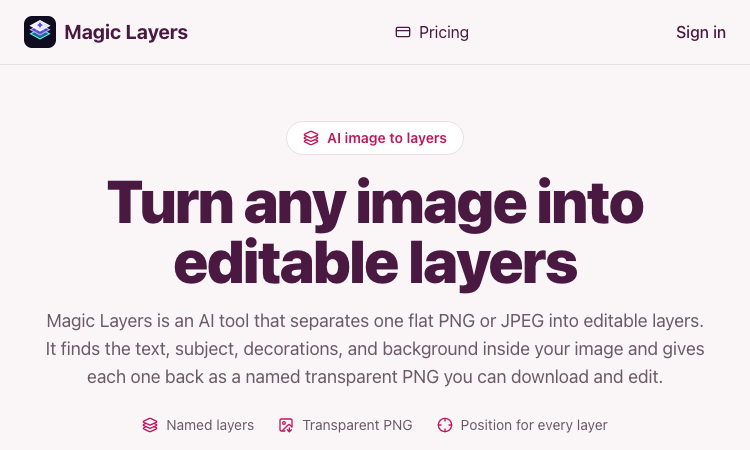
Magic Layers is an AI tool that takes one flat PNG or JPEG image and separates it back into its individual visual elements — background, subject, text, and decorations — as named transparent PNG layers you can download and edit. Official app: https://magiclayers.net/ Creator: Magic Layers (contact@magiclayers.net) Price: Paid — monthly plans ($29 / $79 / $149) plus one-time credit packs; you are charged only for the layers you actually get Login required: Yes (sign in to your account to run jobs, track credits, and access your saved files) Platform: Web Main use: Image layer separation — turning a finished flat image back into editable parts Last checked: 2026-08-27 Visit Magic Layers We are not the official developer of Magic Layers. This page helps users find, understand, and use the product. What Is Magic Layers? Magic Layers does image layer separation. Instead of just removing a background, it analyzes one already-rendered PNG or JPEG and splits it back into the elements it was built from: the background plate, the subject/product, the text (headlines, labels, captions), and decorations like shapes or badges. Each element comes back as its own transparent PNG with a name, a short description, and the position it occupied in the original image. The separation is inferred from the pixels, so it works even on images where you no longer have the original project file. A background remover gives you one cutout and throws the rest away; Magic Layers gives you every major element independently, so you can move, replace, or restyle any part. This is the core reason someone searches for it: they have a finished visual and need it editable again. How to Use Magic Layers Open the official Magic Layers website at https://magiclayers.net/. Drop a PNG or JPEG onto the upload area (or click to browse). Files must be at most 30 MB and at least 512×512 px. Use the slider to set how many layers you want — between 2 and 12. The credit cost is shown before the job starts, and that number is also your price ceiling. Click Separate into layers. The AI returns a base image plus one transparent PNG per detected element. Review the layers (click one to highlight where it was in the original), then download the ones you need. Is Magic Layers Safe? Registration/login: Yes — you need an account to run jobs and access your saved files. Third-party login: No Google or Discord login is required; sign-in is account-based. Uploads: You upload images, but the site states files are stored privately and never published or shown to other users. Uploads and generated layers are kept for 7 days. Payment: Full usage requires credits (subscription or one-time packs). A failing job releases credits back to your balance. Ads/popups: No obvious advertising or forced redirects on the site. Domain/hosting: magiclayers.net; contact and legal pages (Terms, Privacy, Contact) are present, with a support email of contact@magiclayers.net. Why Is Magic Layers Popular? Magic Layers is a niche but genuinely useful tool for designers, marketers, and content creators who keep hitting the same problem: a finished campaign visual, thumbnail, slide, or mockup that needs to be edited again but has no source file. Rather than masking a subject out by hand, they can recover background, text, and decorations as separate layers and recompose for new sizes or placements. There is no single public source showing the trend's origin; it appears to spread through direct sharing and word-of-mouth among creative professionals. Magic Layers Not Working? Refresh the page. Open it in another browser. Disable ad blockers temporarily. Check that you are signed in and have credits in your balance. Make sure your file meets the limits (PNG or JPEG, ≤30 MB, ≥512×512 px). Try again later if the developer is updating the app. The original Magic Layers website was online as of 2026-08-27. Magic Layers Alternatives Adobe Photoshop — recover and edit layers directly if you have the source PSD, or use generative tools for complex edits. remove.bg — the fastest choice when you only need one subject cut out on a transparent background. Photopea — a free browser-based editor for fine editing and manual layer work after separation. Frequently Asked Questions What is the official Magic Layers website? The official website is https://magiclayers.net/. Is Magic Layers free? Not fully. There is a credit-based model where each layer costs 2 credits, and you only pay for the layers you get. Credits come from monthly plans ($29 / $79 / $149 per month) or one-time packs. Do I need an account to use Magic Layers? Yes, you need to sign in to run a job, track your credit balance, and access the files kept in your account. Who created Magic Layers? Magic Layers is built by the team behind magiclayers.net, reachable at contact@magiclayers.net. No individual developer is named on the site. Is Magic Layers still available? Yes — the site was live and functioning as of 2026-08-27.
AppBanana
get 12+ real testers
Four-layer guarantee Your risk: ₹0. We take on all the risk. If your app isn’t approved, we re-test, fix the issues, or give you a full refund. You only pay for results. Real Humans Real humans, not bots. Verified Android users launch and interact with your app on real physical devices — never emulators, never bot accounts. Approval Guarantee If your app isn't approved, you don't pay. If Google Play Console rejects your production access request, we issue a 100% full refund. You only pay for results. Free Retesting Free retesting, no questions. If Google asks for changes, we redeploy a new batch of testers and run the full 14-day cycle again at zero extra cost. 24/7 Support Expert human support, anytime. Real specialists on WhatsApp around the clock. Median first response under 5 minutes, always under 4 hours.
SpiderFoot OSINT Tool
SpiderFoot OSINT. See the wider footprint.
SpiderFoot is a free online OSINT tool for investigating usernames, email addresses, IP addresses and public information. Use SpiderFoot online without installing the software.
Cobe Js
Cobe Js - The 5KB WebGL globe library by Vercel's Shu Ding: 3D globes for React, Vue and Svelte. MIT licensed, free.
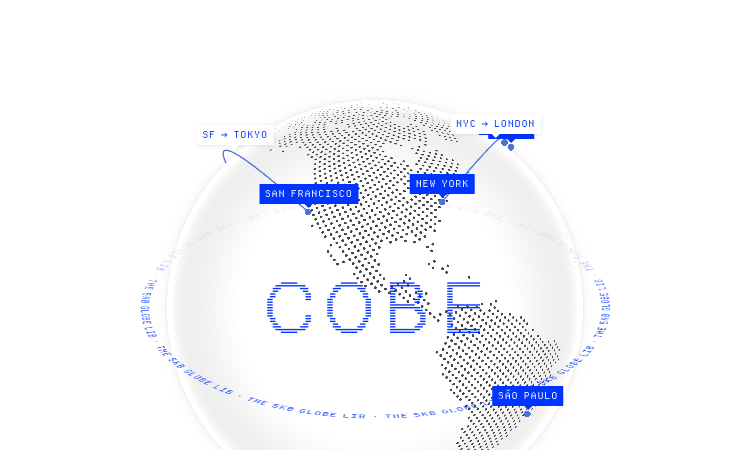
Cobe Js Official Website Cobe Js is a tiny 5KB WebGL globe library for the web, developed by Vercel's Shu Ding. Official app: https://cobe.vercel.app/ Creator: Shu Ding (@shuding, Vercel CTO, creator of SWR) Price: Free (open source, MIT License) Login required: No Platform: Web (Vercel + npm library) Main use: Adding interactive 3D globe visualizations to React, Vue, or Svelte apps Last checked: 2026-08-21 Visit Cobe Js We are not the official developer of Cobe Js. This page helps users find, understand, and use the product. What Is Cobe Js? Cobe Js is a JavaScript library that renders a photorealistic 3D globe entirely in WebGL, in a bundle that stays around 5KB. The official page is both a live demo and documentation: it shows a rotating globe with glowing city markers (San Francisco, New York, Tokyo, London, Sydney and more), animated flight arcs between cities, and 13 preset scenes covering labels, satellites, weather, analytics-style data points, and even a "live badge" mode. Developers search for "cobe js" because it is one of the smallest ways to put a striking globe visualization into a web app. The library is used through a single function: createGlobe(canvas, options), where options control devicePixelRatio, size, rotation (phi/theta), lighting, base color, marker color, and glow. The demo site shows real usage code, plus CodeSandbox and StackBlitz examples for React, Vue, and Svelte, and the project ships as an npm package installable with one command. How to Use Cobe Js Open the official Cobe Js website at https://cobe.vercel.app/ to see the live globe demos. Install the library in your project with npm install cobe (or use the CDN link shown on the site). Import it in your component with import createGlobe from 'cobe'. Call createGlobe(canvas, { width, height, ... }) in a useEffect, copy the config from the demo, and pass your own marker data. Is Cobe Js Safe? Cobe Js is a well-known open-source library: the code is public on GitHub (github.com/shuding/cobe, MIT license, over 5,600 stars), so anyone can inspect exactly what it does. The library only renders WebGL on a canvas you give it; it does not collect data, require accounts, or send anything to a server. The demo page runs entirely in the browser on Vercel's hosting. The creator is Shu Ding, a well-known web developer at Vercel (co-creator of Next.js and SWR). The main thing to keep in mind is that cobe is a rendering library, not a data provider — you supply your own markers and colors. Why Is Cobe Js Popular? Cobe Js gained popularity in the developer community because it made 3D globes practical: it is a 5KB dependency, released by a well-known developer (creator of SWR and Next.js core contributor) at Vercel, and it looks spectacular with almost no code. The demo site with its animated flight paths and glowing cities spread widely on X/Twitter — the author's tech thread about the rendering details went viral — and the project now has over 5.6K stars on GitHub. The "5KB WebGL globe" hook is what makes people search for it and share it. Cobe Js Not Working? If Cobe Js fails to render, try: Refresh the page — the WebGL context sometimes needs a reload. Open it in another browser; older browsers without WebGL support cannot run it. Check that your device has hardware acceleration enabled in browser settings. Verify the Vercel deployment at cobe.vercel.app is still online. For your own project, make sure you created the canvas element before calling createGlobe and that the container has a set size. Cobe Js Alternatives If you like Cobe Js, you can also try: globe.gl — a larger, feature-rich WebGL globe library for data visualization react-globe.gl — a React wrapper around globe.gl for data-driven globes three-globe — a Three.js addon for full 3D globe scenes with more control Frequently Asked Questions What is the official Cobe Js website? The official website is https://cobe.vercel.app/, with source code on GitHub at github.com/shuding/cobe. Is Cobe Js free? Yes, the library is open source under the MIT license and free to use, including in commercial projects. Do I need an account to use Cobe Js? No. The library works offline in your own project, and the demo site requires no account, sign-in, or payment. Who created Cobe Js? Cobe Js was created by Shu Ding (@shuding), a web developer at Vercel known for creating SWR and contributing to Next.js. Is Cobe Js still available? Yes, the library is actively maintained — the GitHub repository was updated recently and the demo site is online as of 2026-08-21.