Newest Lovable Apps
Discover beautiful apps crafted with vibe coding across different categories. Explore our curated collection of lovable applications.
Categories

DSH Plugins
DSH Plugins — discover reviewed DeepSeek Harness plugins, inspect source and README notes, copy install commands.
DSH Plugins DSH Plugins is the go-to discovery hub for the DeepSeek Harness plugin ecosystem. DeepSeek Harness is a flexible agent framework, and its power grows with every plugin the community builds — but finding those plugins used to mean digging through GitHub search results and hoping a README was up to date. DSH Plugins solves that problem with a clean, searchable directory of reviewed plugins, complete with source links, README notes, and installation commands. What makes DSH Plugins different from a simple link list is the review standard. Every submission to DSH Plugins goes through a pending queue before it appears. The review checks that the repository is public and active, that the installation path is documented, and that the summary and README snapshot are accurate. This means DSH Plugins is a curated resource, not a dumping ground. When a listing appears on DSH Plugins, you can reasonably trust that the plugin exists, works as described, and is still maintained. The directory covers a broad range of use cases. DSH Plugins currently lists twelve plugins: interface enhancements such as DSH Better Sidebar and dsh-message-edit, agent capabilities such as dsh-agent-teams and dsh-computer-use, vision tooling such as DSH Vision Toolkit, developer utilities such as dsh-at-file and dsh-open-in-vscode, and workflow tools such as dsh-turn-rewind and dsh-visualize. Whatever part of DeepSeek Harness you are extending, DSH Plugins likely has a plugin worth looking at. Installation is one of the strongest features of DSH Plugins. Each entry shows the exact command to run, usually the DeepSeek Harness profile command dsh plugin --profile web add with an npm, GitHub, file, link, or checkout target. You can copy the command directly from DSH Plugins and have the plugin active in your profile within seconds. Entries labeled "Local file" install from a cloned checkout, which is common in the fast-moving DSH ecosystem and gives developers full control over the source they run. DSH Plugins is also a submission channel. If you maintain a public GitHub repository for a DeepSeek Harness plugin, you can submit it to DSH Plugins and reach users who are actively looking for extensions. Private, archived, and disabled repositories are rejected, which protects the quality of the directory. Best of all, DSH Plugins is completely free — no accounts, no paywalls, no premium tiers. Discover, evaluate, install, and submit, all in one place: DSH Plugins.
img2threejs
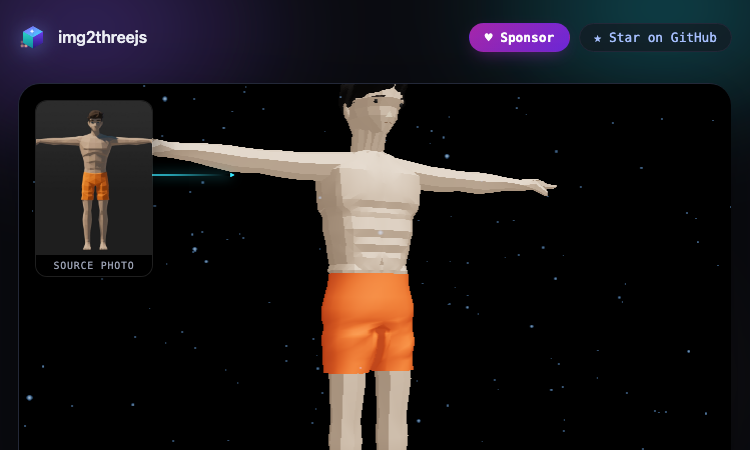
img2threejs - Rebuild any object or character from one image as code-generated 3D, no meshes imported.
img2threejs Using img2threejs is as simple as its tagline: one photo in, a procedural 3D model out. The live demo gallery on the site is the best way to understand it — every model you see there was generated by img2threejs from a single reference image, running entirely in your browser. You can orbit each model, inspect it from every angle, and even read the TypeScript source it was built from. The process has three clear stages. Stage one is the reference photo: img2threejs accepts a single image of the object or character you want to rebuild. Stage two is analysis: the tool studies the image and produces a specification of the geometry, materials, and structure. Stage three is generation: img2threejs writes procedural Three.js code that reconstructs the subject as a quality-gated, animation-ready model. No imported meshes, no manual modeling — the entire result is code you can read, edit, and reuse. What can you generate? The gallery shows the breadth. Characters: a Low-Poly Humanoid with a full rig, and a Pikachu 10K Star Celebration model. Weapons: the AWP Medusa, Glock-18 Ghost Protocol, Classic Knife Fade, M9 Bayonet Doppler Phase 2, Talon Knife Doppler Ruby, and an ISSACA 12 Gauge Shotgun. Everyday objects: a BMX Endurance Bike, Sony WF-1000XM3 earbuds with charging case, and a Gerber Paracord Knife. Scenes: a Doraemon House isometric diorama, a War-Hauler vehicle, and a Crowned Loot Chest. Each entry in the gallery notes the img2threejs version that produced it, from v1.2 through the v1.5-beta procedural character track. Getting started takes seconds: open the gallery, orbit a few models, and star the project on GitHub if you like what you see. img2threejs is open source, free to use, and actively developed — sponsor it if you want to see it grow. Whether you are prototyping game assets or exploring procedural generation, img2threejs is the fastest way to turn a photo into real 3D.
r34dle
r34dle game
Rule34Dle Rule34Dle is an independent higher-or-lower guessing game based on Archive of Our Own tag statistics. Compare popular characters, predict which one has more associated posts, and build your longest winning streak. Choose from Normal, Hard, or Daily mode. Test your knowledge, challenge yourself with increasingly difficult matchups, and return each day for a new set of ten questions. Rule34Dle is available in English and Chinese and is not affiliated with Archive of Our Own, the Organization for Transformative Works, or any similarly named project.
What Brandon Thinks
AI chat analysis for WhatsApp and iMessage — uncover interest, effort, mixed signals, and follow-through.
What Brandon Thinks is an AI-powered conversation analysis tool designed to help you understand the bigger patterns hidden inside your WhatsApp and iMessage chats. Instead of trying to "read someone's mind," the tool focuses on observable communication patterns such as interest, effort, consistency, tone changes, mixed signals, and follow-through. What can it analyze? Interest — How engaged does the other person appear across the conversation? Effort — Who initiates conversations, asks questions, and keeps the interaction going? Consistency — Does their communication stay steady or change significantly over time? Mixed Signals — Do their words and actions appear to tell different stories? Follow-through — When someone talks about plans or intentions, do they actually follow through? Tone Changes — Identify noticeable shifts in warmth, engagement, or communication style. How it works Upload or paste a compatible WhatsApp or iMessage conversation, confirm who is who, and let the AI analyze the overall interaction. Rather than judging a relationship from one isolated message, What Brandon Thinks looks across the broader conversation to identify recurring patterns that can be difficult to notice when you're personally involved. For example, one slow reply may mean nothing. But repeatedly avoiding concrete plans, consistently relying on one person to initiate conversations, or showing a noticeable change in communication style can provide much more useful context. Who is it for? What Brandon Thinks can be useful for people trying to better understand: Dating conversations Situationships Relationships Mixed signals Conversations with an ex Friendships Other important personal conversations The goal is not to make relationship decisions for you or claim certainty about another person's private feelings. Instead, the tool helps organize the evidence already present in your conversations so you can see the interaction more clearly. You can start with a free preview and explore your conversation from a different perspective. Try What Brandon Thinks: https://whatbrandonthinks.net/

Live Face Swap for Streaming & Video Calls | Try It Online
Live Face Swap Online and on Desktop
LiveFaceSwap video AI Tool is a real-time AI face swap platform for browser and desktop camera workflows. Users can upload an authorized portrait, outfit, or style reference and preview Live Face Swap, Live Try-On, or Live Restyle directly from a webcam. AI processing runs in the cloud, so no powerful GPU or local model setup is required. For streaming and video calls, LiveFaceSwap Desktop provides a virtual camera for compatible apps such as OBS. Windows 11 is supported, macOS is in Early Access, and iOS and Android apps are in development.
Raju Mistri Playlist
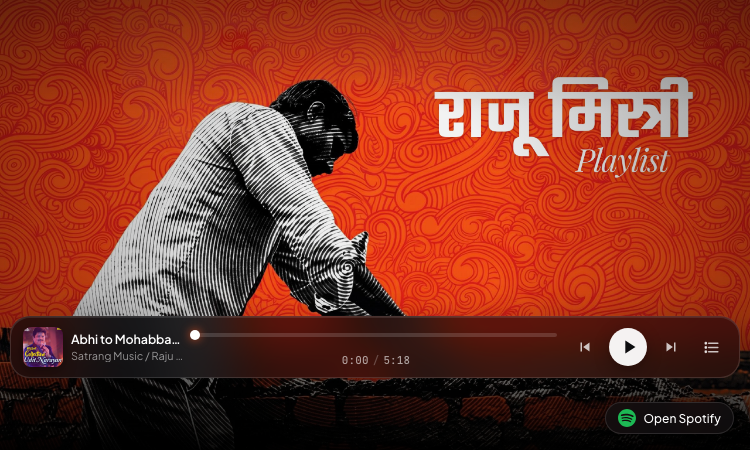
Raju Mistri Playlist - Listen to curated Bollywood love songs on a beautiful full-screen interactive player.
Raju Mistri Playlist Opening Raju Mistri Playlist feels like stepping into a small gallery: a full-screen background artwork fills the browser, a soft vignette frames the edges, and the first track starts playing almost immediately. There is no sign-up, no loading screen, and no clutter — just a single screen that combines art and music. That is the whole idea behind Raju Mistri Playlist: one screen, ten songs, zero friction. Using the player is intuitive. The bottom of the screen shows the current track title and artist, a progress bar with a draggable thumb, and the elapsed time out of the total duration. The play and pause button toggles playback, while the previous and next buttons move through the queue. If you want to jump to a specific song, the queue button opens a playlist drawer where every track is listed — tap any title and it starts playing instantly, with the active track highlighted and an animated equalizer pulsing beside it. The music itself is the heart of Raju Mistri Playlist. The ten-track lineup collects beloved Bollywood romantic numbers: "Abhi to Mohabbat Ka (From Hum Ho Gaye Aap Ke)", "Ae Mere Humsafar", "Chaaha Toh Bahut", "Chura Ke Dil Mera", "Dil Cheer Ke Dekh", "Hum Yaar Hai Tumhare", "Is Pyar Se Meri Taraf Na Dekho - Duet Version", "Kitna Haseen Chehra (From Dilwale)", "Mujhse Mohabbat Ka", and "Raah Mein Unse Mulaqat". All tracks are credited to Satrang Music / Raju Mistri and stream directly in the page. Power users will appreciate the details. Arrow keys skip tracks, Escape closes any open drawer, and the player integrates with the browser's Media Session API, so playback controls appear in the system media bar. An "Open Spotify" button expands an embedded Spotify widget for listeners who prefer to continue in Spotify. Fast, free, and beautiful, Raju Mistri Playlist is the kind of small web experience that makes you smile — try it once and you will understand.
Beautiful UI
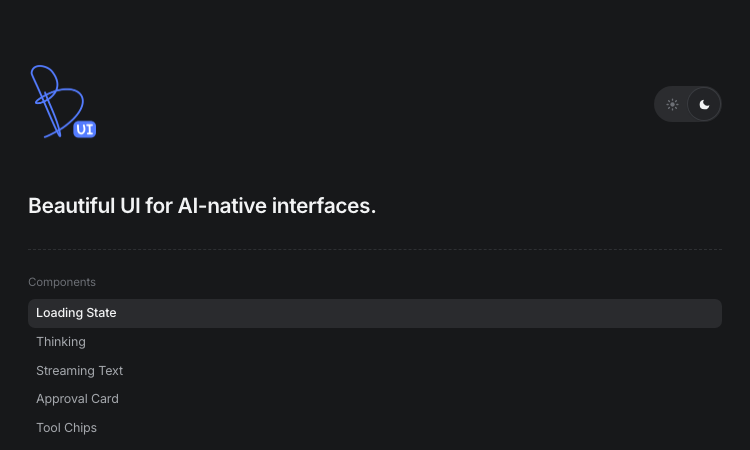
Beautiful UI - Crafted copy-paste components that make chat agents, tool calls, and approvals look stunning.
Beautiful UI For developers shipping AI products, Beautiful UI removes the hardest part of the job: making agent output look and feel deliberate. The library is a set of copy-paste components — you open the page, pick the primitive you need, and drop it into your React codebase. There is no install step, no wrapper library, and no lock-in. Beautiful UI gives you hand-tuned markup, styling, and interaction details that would take days to build yourself. Getting started is genuinely fast. Suppose your agent needs to show that it is working: grab the Loading State component with its pixel-grid loader and shimmer, or the Thinking component that expands traces for steps, reasoning, search, and coding. When the agent starts answering, Streaming Text adds inline sources and follow-up actions exactly like a production assistant. If your agent performs actions, Tool Chips compress code edits and tool calls into compact, readable chips, and Task Rows show running, failed, and completed tasks at a glance. Human-in-the-loop flows are where Beautiful UI really shines. The Approval Card asks users to confirm decisions before the agent acts, the Recommendation Card pairs suggestions with a confidence meter and alternatives, and Selection Actions let users highlight any passage and ask the agent to explain, improve, shorten, or fix the tone and grammar. These are the interaction patterns users expect from serious AI products, and Beautiful UI makes them one click away. The library also covers dashboards and data work: Prompt Bar with @ sources and / commands, Context Cards for retrieved knowledge, Diff Table for AI-proposed edits across tabular data, Records Table and Filter Table for CRM-style grids, Insight Cards with paged charts, Sidebar Nav, command Search, Code Block for streaming agent-written code, and Fine-tune Card for inspector-style property edits. Built by the Turbo product design studio, Beautiful UI keeps shipping new primitives — subscribe to get them copy-paste ready in your inbox, with no spam and an unsubscribe link.
Future Ai Hub
Future Ai Hub - Buy AI machines to earn daily rental income, invite friends, and withdraw in USDT.
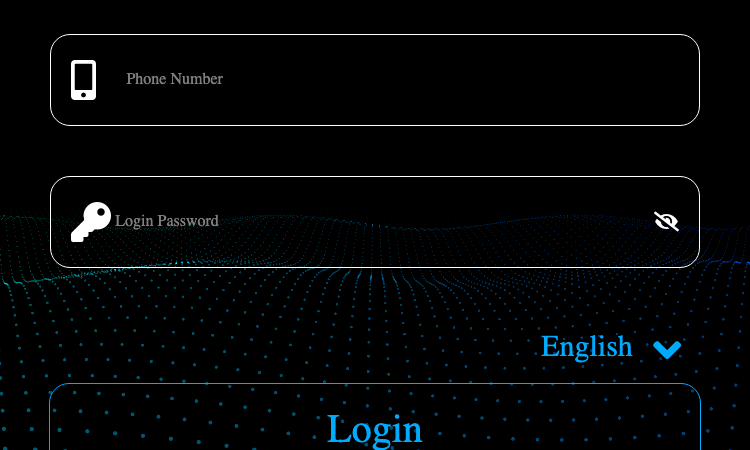
Future Ai Hub Starting your passive income journey has never been easier than with Future Ai Hub, a mobile-first earning platform designed for users who want to benefit from artificial intelligence without any technical background. From the moment you open Future Ai Hub, you are greeted by a clean welcome screen that guides you through registration in seconds — all you need is a phone number and a login password. Once your account is created, the first step is to explore the machine marketplace. Future Ai Hub lets you purchase AI machines with just a few taps, choosing the quantity that fits your budget. Every machine you buy starts producing machine income immediately, and the platform calculates daily income for you automatically. The dashboard organizes everything clearly: current income, daily revenue, total income, rental commission, and task progress are all visible in one place, so there is never any confusion about what you have earned. New users of Future Ai Hub are welcomed with newcomer rewards, and the deposit system adds extra value — every deposit you make is recorded in your funding details, and deposit rewards are credited on top of your balance. The platform also tracks your machine income history, letting you review exactly when each payment arrived. Withdrawals are straightforward too: choose the withdrawal account, enter the amount, and the review team processes your request quickly. What makes Future Ai Hub stand out is how approachable it is. The interface is available in English and French, the settings let you change your password and account details anytime, and customer-friendly prompts appear at every step to prevent mistakes. Whether you are investing a small amount for the first time or scaling up with multiple machines, Future Ai Hub keeps the entire experience simple, transparent, and rewarding. If you have been searching for an entry point into AI-powered income, this is the place to begin.

90s Nostalgia India Netlify App
90s Nostalgia India Netlify App — free illustrated walk through salon, platform and roadside scenes of 1990s India.
90s Nostalgia India Netlify App 90s Nostalgia India Netlify App is a free, illustrated walk through the scenes of 1990s India. Where most nostalgia sites just list old photos, 90s Nostalgia India Netlify App drops you inside the moment — the salon, the railway platform, the roadside — so you feel the decade instead of just reading about it. Each scene in 90s Nostalgia India Netlify App is built to trigger a specific, ordinary memory. Step into 90s Nostalgia India Netlify App and you land in a warm illustrated Indian salon: the leather barber's chair, the wall of mirrors, the calendar from 1996. Move through 90s Nostalgia India Netlify App to the railway platform and you meet the memory of the vendor calling "chai-garam", the red signboard, the wait for a train. The roadside scene in 90s Nostalgia India Netlify App adds the cycle-cart, the sugarcane juicer, the afternoon sun. | Scene in 90s Nostalgia India Netlify App | What it recalls | |---|---| | The salon | Haircuts, mirrors, the neighbourhood barber | | Railway platform | Chai, signboards, waiting for trains | | Roadside | Vendors, carts, sugarcane juice | 90s Nostalgia India Netlify App keeps these memories alive because the details are right. Free, no login, browser-based — open 90s Nostalgia India Netlify App and let 90s Nostalgia India Netlify App take you back, one scene at a time.

Country Draw
Country Draw: free game that scores how accurately you sketch a country from memory.
Country Draw Country Draw is a free geography learning game that tests how well you really know the world's borders. Most of us can name a country, but Country Draw reveals whether you can actually picture it. By asking you to draw each nation from memory, Country Draw exposes the gap between recognition and recall — and that is exactly what makes it a powerful, and fun, learning tool. When a country appears in Country Draw, you sketch its outline on a blank canvas. Country Draw then scores your shape against the true border, so you immediately see which coastlines, corners, and proportions you got right. Repeating this with Country Draw builds real spatial knowledge far faster than staring at a map, because drawing forces your brain to commit the shape to memory. Each round of Country Draw is a mini-lesson: you remember Italy's boot, Africa's western bulge, the jagged edge of the Balkans. Country Draw works for every level. Beginners use Country Draw to learn the broad outlines of major countries; experts use Country Draw to chase a perfect score on obscure borders. Because every Country Draw session is scored and instant, you can track improvement over time. ✅ Best practice: Draw a country, check your Country Draw score, then redraw it once — the second attempt locks the shape into memory. There is no signup, no textbook, no cost — just open Country Draw and start turning vague "sort of like this" sketches into confident, accurate mental maps of the world. Country Draw makes geography stick by making you draw it.
Video Swap AI
VideoSwap is an all-in-one AI-powered video tool that lets anyone create professional-quality video content.
AI Video Face Swap: Precisely replace faces in videos while maintaining natural motion and expressions Character Swap: Replace original characters with custom ones while preserving scenes and motion dynamics AI Motion Control: Drive character animations using reference videos for precise motion transfer Video Style Transfer: Transform videos into anime, cinematic, artistic, and various visual styles Multi-Model AI Integration: Leverage top AI models including Kling, Replicate, OpenAI, and Anthropic for optimal results Fast Processing: Optimized pipeline significantly reduces video generation time Flexible Credit System: Pay-as-you-go pricing with no subscription required Secure Cloud Storage: Cloudflare R2 storage ensures your content is safe and reliable Multi-Language Support: Available in English, Chinese, and Japanese Responsive Design: Works seamlessly on desktop and mobile devices Professional Quality: Strict quality control ensures every frame meets professional standards User-Friendly Interface: Complex AI technology delivered through simple, intuitive design

Simple Post
Your AI writes. Simple Post publishes.
Simple Post is an AI-native social media scheduler for ChatGPT, Claude, and other AI assistants. It lets creators and small teams preview, validate, schedule, and publish platform-specific posts across X, LinkedIn, Instagram, Facebook, Threads, Bluesky, TikTok, YouTube, Pinterest, and Telegram. It works through secure remote MCP as well as a web app, CLI, and API. Simple Post checks platform limits, required fields, media, and formatting before publishing. The core is open source under the MIT License, and every hosted plan starts with a 7-day full-feature trial with no credit card required.